Artificial intelligence is changing the way web applications work, making them smarter, more responsive, and better at engaging users. Thanks to cloud platforms, AI tools are now more easily accessible. Developers are rapidly incorporating advanced features to enhance user experience and streamline operations.
Thinking about how to integrate AI in web app? The Salesforce’s State of IT Report reveals that 84% of IT leaders believe AI will be essential to delivering digital services in the next two years. Moreover, Statista reveals that the number of AI-powered apps is expected to grow exponentially and exceed $500 million globally by 2030. This shows a great opportunity to partner with a leading web app development firm.
In this comprehensive guide, we’ll walk you through the fundamentals of using artificial intelligence in web applications. This will provide you with all the technical and strategic insights to turn AI into real business value.
Ready to make your web app smarter with AI?
Let Trango Tech guide you through the integration process with expert solutions.
Table Of Contents
A Step-by-Step Guide on How to Integrate AI in Web App
These AI tools may look overwhelming, but they’re easier than you think. Artificial intelligence has become a must-have feature in web applications and plays a huge role in user interaction with platforms.
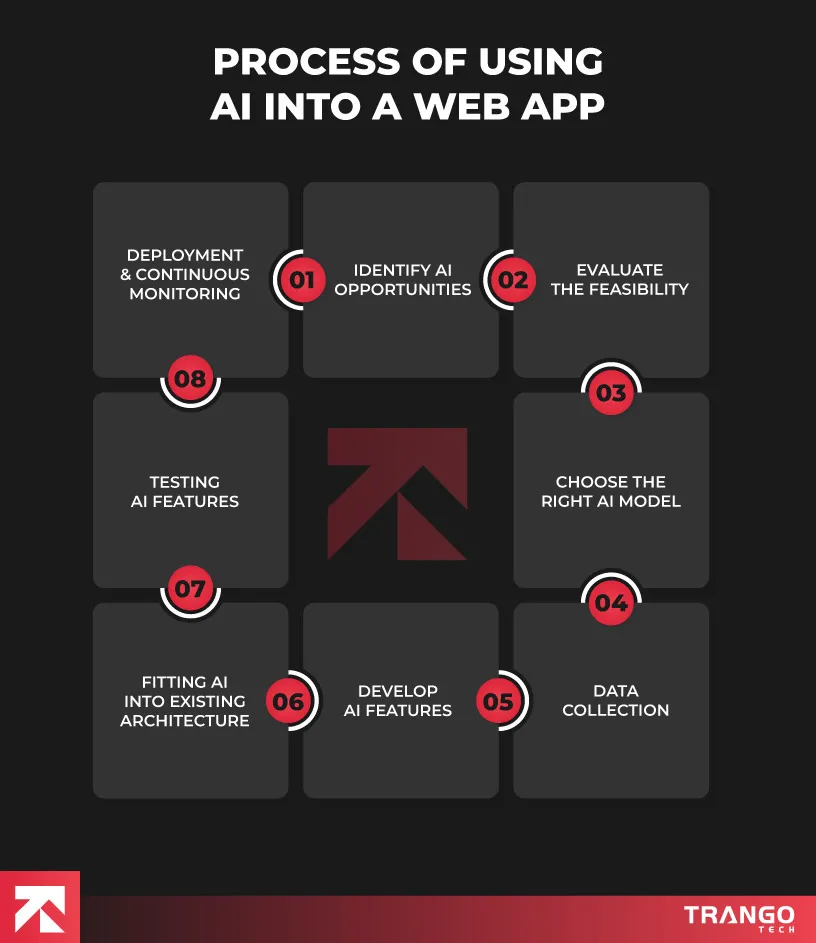
The best part is you don’t need to start from scratch and add AI to your website. Here’s the following guide on how to integrate AI in website app:
1. Identify the AI Opportunities
You need to find the areas that could benefit your app the most from AI. Ask yourself:
What problems can AI solve for my users?
Where can I automate repetitive tasks?
Can AI enhance user engagement or personalization?
For example, a travel booking platform might use AI to suggest itineraries based on past searches. A fitness app could recommend workouts based on a user’s history. Identifying a clear, valuable use case will set the direction for your entire integration process. Look at what competitors are doing with AI and talk to your users. They often reveal pain points you can solve smartly.
You can also explore multimodal AI, which brings together text, images, voice, and behavioral signals to create smoother interactions and more relevant experiences that match how users naturally use your app.
2. Evaluate the Feasibility
Once you have a few solid concepts, evaluate whether they’re technically and financially stable. Ask yourself questions like:
Do I have enough quality data?
Can your current infrastructure handle machine learning tasks?
Will the return on investment justify the cost?
If you’re low on resources or time, consider starting with a simpler AI solution using pre-trained APIs. AI implementation doesn’t have to be massive, many companies start with one lightweight feature and expand over time.
3. Choose the Right AI Model
Choosing the right model depends on your use case. Want to classify user behavior? Use a classification model. Building a recommendation engine? Look into collaborative filtering or deep learning.
You can utilize pre-trained models (available through OpenAI, Google Cloud AI, AWS, etc.). Additionally, you can train your own models using frameworks like TensorFlow, PyTorch, or Scikit-learn. Pre-trained models are faster and cheaper to implement, but offer less customization. Custom models take longer but give you full control.
AI is only as good as the data it learns from. In this step, your goal is to collect, organize, and prepare high-quality data that will power your AI models. You need to identify the type of data your AI feature requires, then assess what is already available in your system. Many existing web applications already have valuable data sitting in databases, user activity logs, or CRM systems that can be repurposed for AI training.
If the data is insufficient or lacks diversity, consider integrating external data sources, APIs, open datasets, or third-party providers. Make sure your data is:
Accurate
Relevant
Compliant with privacy regulations (GDPR, CCPA, etc.)
You may need to structure and label your data depending on the algorithm you’re using. Even anonymized user activity logs can offer deep value for AI when organized properly.
5. Develop AI Features
Once you’ve selected the right AI model and gathered relevant data, it’s time to develop AI-powered web app features. This phase bridges your strategic planning with tangible user functionality. At this stage, you’re building intelligent behaviors that will enhance the core user experience of your web application. Start by identifying where AI adds the most value to your users. These decisions directly influence the development approach and tools you’ll use.
A key step in adding AI to your app is figuring out the kind of model that fits your needs. If your app requires standard features like chat, recommendations, or image tagging, pre-trained models from Google Cloud AI, AWS, or OpenAI can be cost-effective for you. On the other hand, if your app demands highly specific or unique features, a custom-trained model might be the way to go. Even though it takes more time and resources, it gives you control over the behavior and output of your AI. So, take a moment to assess your goals. Do you need a plug-and-play solution or something built just for your business? That decision will shape the entire development process.
Need help selecting the right AI model for your app?
Our team can design a tailored AI solution to fit your needs and budget.
6. Fitting AI into Existing Architecture
The next phase involves connecting AI components with the existing structure of your web app. A clean integration ensures your AI features work efficiently, respond well in live environments, and complement the overall performance of your app. You may need to:
Set up new APIs
Add backend processing layers
Use message queues for real-time tasks
Separate AI logic using microservices
You’ll also need to consider performance, scalability, and latency, especially if the AI model requires significant computing power. Are you new to web development? Read our blog to learn how to build a web app from scratch.
7. Testing AI Features
Testing AI-driven web app solutions is not just making sure it “works,” you’ll need to evaluate accuracy, performance, and the real impact on users. This means running both unit tests and user acceptance testing to catch potential issues early and address them effectively.
And here’s something you definitely shouldn’t ignore: bias and fairness. AI trained on imbalanced data can lead to unfair outcomes, especially in sensitive use cases like hiring, finance, or social apps. Be sure to test for bias across different demographics and watch for skewed results or patterns that can be harmful. For instance, when evaluating multilingual audio data, you can use tools like Notta for Spanish-to-English audio translation to ensure accuracy across languages.
8. Deployment and Continuous Monitoring
After testing and validating your AI features, your web app is now ready for deployment. This is when your users finally get to interact with your AI-powered platform in a live space, and performance under real-world conditions truly matters.
You can begin by selecting the right deployment strategy. You can either:
Embed the model directly into your backend application (suitable for lightweight models).
Deploy ass a standalone microservice with its own API endpoint.
Use cloud-based platforms like AWS SageMaker, Google AI Platform, or Azure Machine Learning.
AI models can become outdated as user behavior, data patterns, or market dynamics shift. That’s why you need to set up a post-deployment maintenance plan to track performance. If you’re wondering how to monetize your web app, our blog outlines the most common methods used for monetizing apps.
AI Tools and Frameworks to Use for Web Applications
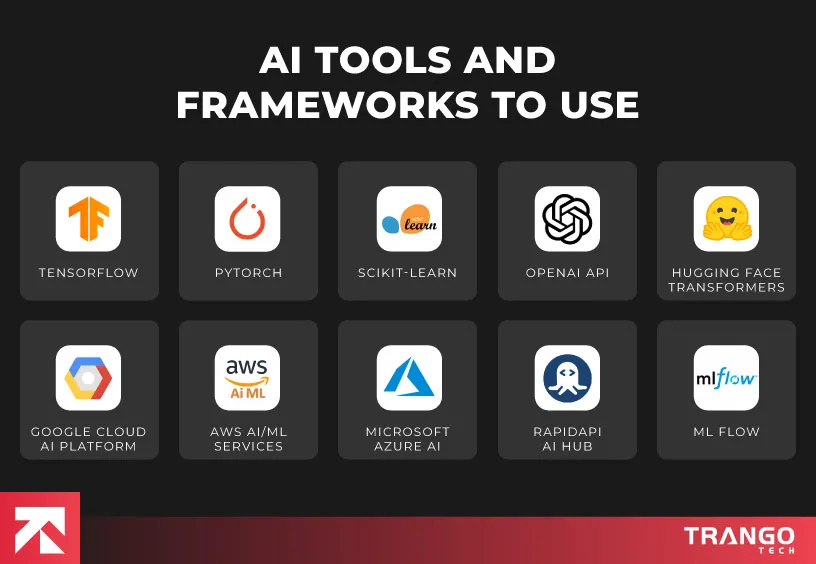
Choosing the right tools and frameworks is essential for building, training, and integrating AI into your web application. Teams often accelerate their mastery of these complex systems by following the specialized educational resources available on Coursiv. And the good news is, there’s no shortage of powerful, developer-friendly platforms to help you launch intelligent features without reinventing the wheel. If you’re a solo developer or part of an enterprise team, the following tools can significantly accelerate your AI adoption:
1. TensorFlow
Best for: Deep learning, image and speech recognition, Natural Language Processing (NLP)
Developed by: Google Brain Team
TensorFlow is one of the most widely used open-source libraries for machine learning in web apps and deep learning. It allows developers to build complex neural networks and deploy models across multiple platforms (servers, mobile devices, and browsers). With support for Keras, TensorFlow makes model building more intuitive. It also supports TensorFlow.js, allowing developers to run models directly in the browser.
Use Cases in Web Apps
Real-time fraud detection
Personalized recommendations
Computer vision in eCommerce (e.g., product tagging)
2. PyTorch
Best for: Rapid prototyping, research-focused applications
Developed by: Meta (Facebook)
PyTorch offers dynamic computational graphs and makes it an ideal framework for researchers who frequently need to test and modify models. Its syntax is clean and Pythonic to debug and implement machine learning logic.
Use Cases in Web Apps
Chatbots with complex NLP models
AI web app personalization
AI-based content moderation
3. Scikit-Learn
Best for: Traditional machine learning algorithms (classification, regression, clustering)
Developed by: Community-driven, backed by INRIA and other contributors
Scikit-learn is a go-to library for classical machine learning. It includes efficient tools for data mining, preprocessing, and model evaluation. While it’s not built for deep learning like TensorFlow or PyTorch, it excels at handling everyday ML workflows with ease.
Use Cases in Web Apps
Predictive analytics web apps
Customer segmentation
Spam detection
4. OpenAI API
Best for: Natural language generation, conversational AI, image generation
Developed by: OpenAI
The OpenAI API gives developers access to powerful pre-trained models like GPT-4 for language, DALL-E for image generation, and Whisper for speech recognition. You can easily integrate these models into your app with just a few simple API calls.
Best for: Pre-trained NLP models, sentiment analysis, translation
Developed by: Hugging Face
Hugging Face takes the complexity out of NLP by offering pre-trained models for common tasks like text classification, translation, and question answering. Their versatile Transformers library supports both PyTorch and TensorFlow, so you can easily integrate it into your existing setup.
Use Cases in Web Apps
Sentiment analysis on user reviews
Text summarization
Language translation
6. Google Cloud AI Platform
Best for: Scalable deployment, AutoML, big data AI applications
Developed by: Google Cloud
This platform allows developers to build, deploy, and manage machine learning models. It includes tools like Vertex AI, AutoML, and a range of pre-trained APIs for vision, speech, and language.
Use Cases in Web Apps
Smart search engines
Real-time video analysis
Voice-enabled interfaces
7. AWS AI/ML Services
Best for: Full-stack AI development and deployment in the AWS space
Developed by: Amazon Web Services
Amazon Web Services (AWS) offers comprehensive services, including Amazon SageMaker (model training and deployment), Rekognition (image analysis), Comprehend (text analysis), and Lex (chatbots). These services are well-integrated with AWS cloud tools for scalable applications.
Use Cases in Web Apps
Voice assistants
Image moderation in social platforms
Text classification and summarization
8. Microsoft Azure AI
Best for: Enterprise-grade AI with strong compliance and governance
Developed by: Microsoft
Azure AI offers services such as Azure Cognitive Services and Azure Machine Learning for developing intelligent applications. The platform supports responsible AI practices, including fairness assessments and bias detection.
Use Cases in Web Apps
Visual search in eCommerce
Speech-to-text in video conferencing tools
Document summarization
9. RapidAPI AI Hub
Best for: Easy access to third-party AI APIs
Developed by: RapidAPI
RapidAPI enables developers to discover, test, and connect to thousands of APIs, including image recognition, emotion detection, and voice-to-text. It simplifies rapid prototyping and experimentation.
Use Cases in Web Apps
Emotion analysis in video feedback
Quick chatbot integration
OCR for scanned documents
10. MLflow
Best for: Managing the ML lifecycle (experiments, deployment, tracking)
Developed by: Databricks
MLflow provides tools to manage the end-to-end machine learning lifecycle. It supports experiment tracking, model packaging, and deployment to various environments. It is ideal for teams working on multiple iterations of models.
Use Cases in Web Apps
A/B testing of models
Continuous training and deployment pipelines
Monitoring model performance in real-time
Want to integrate AI seamlessly into your web app?
Let Trango Tech build a scalable, user-friendly AI solution for you.
Tips and Best Practices for Using AI in Your Web Application
Artificial intelligence is making a big impact on how modern web apps are built and used. As more developers and product teams race to infuse AI into their digital experiences, the real differentiator isn’t who adopts it fastest, it’s who does it right.
McKinsey’s Global AI Survey reports that while 78% of companies have adopted AI in some form, only 25% have managed to scale it effectively. So, what’s holding them back? For many, it’s the lack of a clear strategy, no defined objectives, no long-term roadmap, and no solid infrastructure to support AI as it grows.
At the same time, users are now more cautious and informed. They want to know how AI affects their experience, and they expect companies to be open, responsible, and ethical. That’s why earning their trust is the most important task to consider.
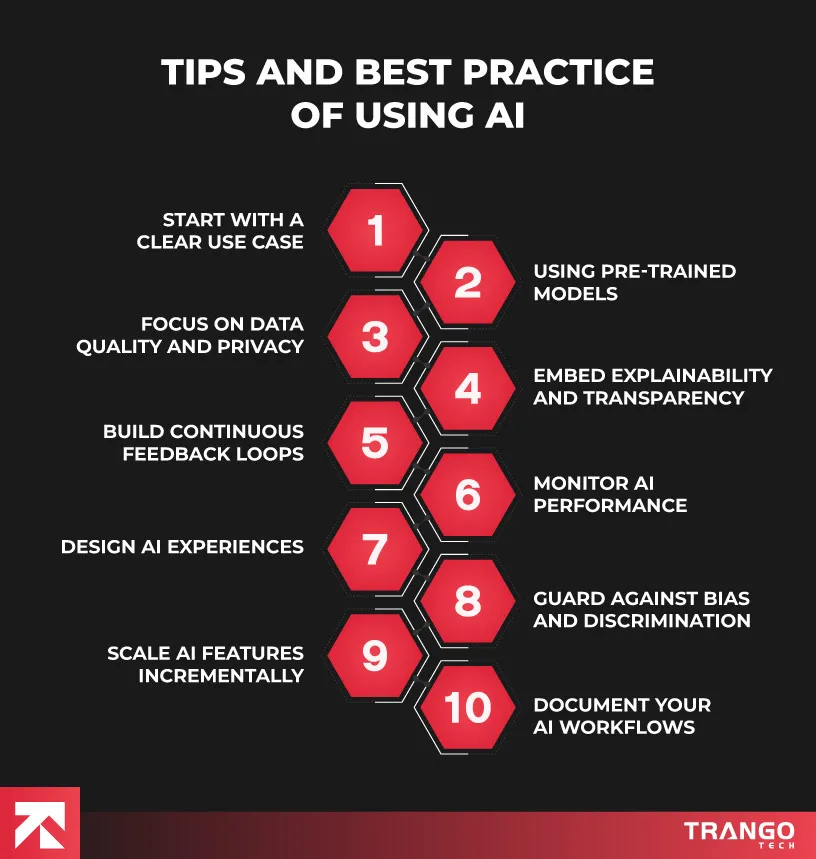
In this section, we’ll explore the most effective ways to integrate AI into your web app:
1. Start with a Clear Use Case
Before jumping into coding or choosing AI tools for web development, start by identifying a concrete, high-impact problem that AI can solve in your application. Avoid vague ambitions like “making it smarter.” Instead, focus on where AI adds tangible value.
Before you start coding or exploring AI tools for web development, get a clear idea on what problem you’re trying to solve. Don’t go for vague goals like “make it smarter.” Look for areas where AI can deliver real, measurable value, like automating repetitive tasks, improving recommendations, or enhancing user support.
According to a Deloitte study, companies that launched with a targeted AI use case were 43% more likely to succeed in deploying their solution.
Here are the following examples of high-value practical applications:
Recommending content or products based on user behavior
Improving user retention through predictive churn analysis
Building custom AI models can be costly and time-consuming. A more efficient approach is to leverage pre-trained models. Numerous studies show that AI-powered startups have significantly reduced development time by using pre-trained models from providers like Google, OpenAI, Hugging Face, and AWS. These models can be easily customized through transfer learning or fine-tuning with minimal effort.
Let’s dive into the following use cases:
OpenAI’s GPT-4 Turbo for conversational interfaces
AI is only as good as the data it’s trained on. Poor quality or biased data will lead to poor results and untrustworthy systems. A Gartner survey revealed that 58% of AI failures stemmed from poor data quality or inadequate data management practices.
Here are the following best practices for quality and privacy:
Clean and normalize datasets regularly
Perform bias audits using tools like IBM Fairness 360
Anonymize sensitive data using tokenization or differential privacy
Comply with local and global laws (GDPR, CCPA, HIPAA)
4. Embed Explainability and Transparency
AI systems should be transparent. Users and stakeholders want to understand how decisions are made, especially in sensitive areas like finance, healthcare, and hiring. According to Capgemini’s 2025 report, 71% of consumers are more likely to trust an AI-driven system in their shopping experience.
Here’s how to implement explainability:
Display confidence scores with recommendations
Use frameworks like SHAP or LIME to show why a model gives a certain output
Provide users with “Why this result?” explanations for transparency
5. Build Continuous Feedback Loops
AI models need to evolve over time. Use feedback loops to constantly improve performance. This could be collecting user ratings, corrections, usage data, or flagging errors to refine predictions. Feedback loops enable your AI to become smarter, more personalized, and better aligned with real-world use.
Here are the following implementation tips to go for:
Create a “thumbs up/down” system on AI suggestions
Retrain models monthly or quarterly with new data
Log misclassifications or ignored AI recommendations
6. Monitor AI Performance
AI systems must be actively monitored after deployment. Key metrics like accuracy, latency, model drift, and hardware efficiency can reveal early signs of model degradation. Netflix’s 2024 implementation of real-time drift detection shows how proactive monitoring can reduce prediction errors and maintain model relevance.
You can opt for the following recommended tools:
Prometheus + Grafana for metric tracking
Seldon or MLFlow for model lifecycle management
AI observability platforms like Arize or WhyLabs
7. Design AI Experiences Around the User
AI can be a great technology to enhance the user experience. Users should feel in control and well-supported. It can be a chatbot, a search engine, or an auto-fill system. According to Adobe’s 2025 UX Trends Report, 68% of users abandoned AI tools that feel intrusive or robotic. You can involve UX designers early to prototype AI workflows and test them with real users.
Here are the following UX best practices you can go for:
Let users override AI decisions
Keep AI outputs consistent with the brand voice
Use a human fallback in chatbot interactions
Don’t overload users with recommendations
8. Guard Against Bias, Discrimination, and Ethical Pitfalls
Bias in AI can lead to unethical outcomes, such as excluding certain groups from services or generating unfair predictions. The PwC AI Outlook Report states that 46% of AI development teams added “Responsible AI” roles in 2024-2025.
If you’re looking for mitigation strategies, here are the following best practices:
Test your models across diverse demographics
Use fairness metrics (equal opportunity, demographic parity)
Train teams in responsible AI development
Ensure human oversight in sensitive AI workflows
9. Scale AI Features Incrementally
Don’t implement five AI features at once. You can start with a single feature, such as a smart search bar or an auto-tagging system, optimize it, measure user engagement, and then move to the next.
For example, Slack introduced AI-based message summaries in isolated channels before rolling them out globally. This phased approach resulted in a 22% improvement in adoption and a decrease in support tickets.
Here’s why this approach works:
It simplifies testing
This practice reduces development overhead
You can isolate and solve bugs more easily
It minimizes tech and UX debt
10. Document Your AI Workflows
Every AI action should be documented, including training data, model version, hyperparameters, and feedback methods. This helps teams collaborate, resolve issues, and maintain compliance.
Here’s the governance checklist for better help:
Who trained the model?
What data was used, and when?
How often is it updated?
Are compliance standards being met?
Toolkits:
DVC (Data Version Control) for datasets
MLflow for model tracking
Governance platforms like Aporia or Fiddler AI
Collaborate with the Top Mobile App Agency
The use of AI in your web application creates tangible value for both your users and your business. As we’ve explored, the path of AI integration in web applications is not like plugging in a model or two. You need to identify where AI can genuinely improve your app, collect clean, unbiased data, and ensure your models are transparent, reliable, and continuously learning.
With the right mindset and best practices in place, AI can become your application’s smartest asset. Looking for the leading mobile app development company? Trango Tech has a team of skillful developers who know how to bring your idea to a revenue-generating app.
Ready to launch an AI-powered web app that stands out?
Partner with Trango Tech to build a cutting-edge solution tailored to your business.
Frequently Asked Questions
Q. How to integrate AI into a web app?
There are several key steps to using AI in web apps. You can start by identifying a specific use case, such as personalized user experiences, automating responses, or improving recommendations. This forms the core of AI-driven web app solutions to create smarter, user-centric applications.
Once the model is built, you need to add it to your web app using APIs or SDKs. Smooth integration with the backend is essential for optimal performance and scalability. Continuous testing, monitoring, and user feedback loops maintain accuracy and improve over time.
Q. How can I add generative AI to my website?
You can add generative AI to your website for building dynamic experiences such as generating text, images, or even code. Numerous tools are used, like OpenAI (ChatGPT or DALL-E), Google Vertex AI, and Hugging Face, to offer ready-to-use APIs.
Here’s a step-by-step process of adding generative AI:
Choose a use case (chatbot, content generator, personalized email drafts, image creation, or smart search)
Select a generative AI model or API
Set up API access
Design the user interface
Handle performance and cost
Make sure it is ethical and secure
Q. How much does it cost to integrate AI into an app?
It really depends on what kind of AI features you want to add. If you’re going for something simple like a chatbot or smart search, and you’re using tools like OpenAI or Google Cloud, it can normally start from $5,000. But if you’re aiming for more advanced solutions, like adding image recognition, custom language processing or predictive analytics, then you’re looking at a much larger project. These types of web apps require more data, development time, and testing. So, the cost can go up to $50,000 or even $100,000+.
Q. Is implementing AI expensive?
AI implementation costs can vary a lot depending on how you approach it. If you’re building a fully custom solution and using your own data, tea,m and dedicated infrastructure, it can turn into a major investment. But there’s a more budget-friendly route, too. Many businesses save time and money by using pre-trained models and cloud-based AI services. Platforms like OpenAI, AWS, and Google Cloud let you integrate features like chatbots or recommendation engines without breaking the bank. Since these services are often pay-as-you-go, you only pay for what you use.
Q. How long does it take to train an AI model?
Training an AI model can take anywhere from a few hours to several weeks and it all comes down to what you’re building. If you’re working with a simple model and a small dataset, training might be done in just a few hours. But, if you’re dealing with something more advanced, like a deep learning model with tons of data, it can take you days or even weeks (especially if you’re using high-performance GPUs or TPUs).
Now, if speed is a priority, many teams choose to fine-tune pre-trained models like GPT or BERT. These models already contain a lot of knowledge, so you only need to tweak them a bit to suit your needs. It saves time, reduces cost, and gets your AI features up and running much faster.
Rida Shahzad is a business graduate and seasoned content writer at WareGo, where she transforms complex concepts into clear, actionable content. With a strong background in creating how-to guides, conversion-focused content, and technical documentation, Rida excels at bridging the gap between advanced technology and real-world business needs. Off the page, she’s a curious mind with a love for ancient history, tech trends, and creative sketching.