Data Silos
The Silent Productivity Killer
21% of time spent searching for information

Trusted by Clients Worldwide: Rated 4.9 Star


21% of time spent searching for information

Endless cycles of re-entering data

Slow decisions = lost opportunities

Companies with disconnected systems
waste $12,000 per employee annually
Trango Tech addresses all the challenges that hinder the connection of diverse systems.
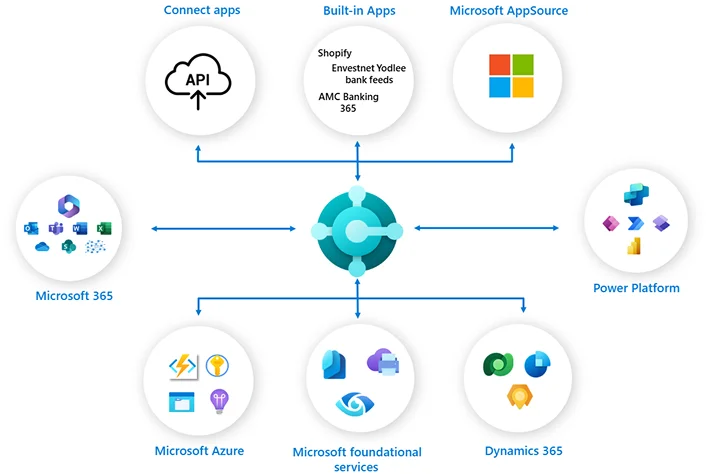
Microsoft Dynamics BC integration breaks down silos by offering a unified view to the departments.
Immediate access to live data enables businesses to view it in real time. It enables smarter and faster decision-making.
The data synchronization rules applied ensure accurate, unified data across all platforms, eliminating duplicate information.
Microsoft Dynamics BC integration breaks down silos by offering a unified view to the departments.
Adherence to API call strategies results in maintaining smooth operations.
Streamlines sales processes and speeds up the entire process to bring in more revenue, from instant quotes to invoicing.
Trango Tech is a certified Business Central integration partner offering future-ready integrations. Book a Call

Our platform-specific Business Central integration for growing businesses sets the foundation for future-ready expansion.
Trango Tech offers Dynamics 365 Business Central integration services to connect disparate systems for unifying operations.
We connect Business Central to external systems using Business Central API integration. This integration enables real-time data access, cross platform compatibility and secure communication.

Middleware-based integration connects disparate systems for seamless data sharing. Azure Logic Apps Business Central integration improves reliability by enabling scaling and efficient handling of complex workflows. It is suitable for businesses that need Enterprise Grade Business Central middleware integration. Power Automate Business Central workflows automate tasks without heavy coding.

Real-time Business Central integration processes data instantly, while batch integration processes large amounts of data in chunks.

One-way integration is for simple, single tasks, while Bi-directional Business Central integration syncs data in both directions.

Trango Tech is here to change the way businesses operate with Business Central Integration services across diverse industries.
We offer you the best services as a Microsoft Solutions Partner. It gives us access to the latest Microsoft innovations, beta programs, and technical resources. Get advanced and up-to-date capabilities in the Microsoft ecosystem.
Get Business Central CRM Integration and Salesforce Business Central Integration services from our skilled professionals who master the art of Dynamics 365 BC Integration Solutions.
Our agile development practices drive 300% ROI with every Microsoft Business Central Integration. We keep track of the work with regular updates and feedback to align with the business goals.
We know your industry and offer pre-built integration templates to offer you something that adds value to your business. We apply best practices to reduce Business Central Integration Costs while maintaining your budget..
 98% Client Satisfaction
  500+ Successful Projects
  24/7 Support
 Trango Tech uses reliable Microsoft and enterprise technologies that include:


Avail of our Expert Business Central
integration services to boost your
business. Talk to an expert

Our industry-specific solutions are designed to fulfill your business needs.

Manage online stores with centralized inventory management, finance, and customer service.

Track medical supplies, manage patient records, and ensure compliance with standards.

Manage projects with job costing, budgeting, compliance, finance, and field operations.

Manage crop, livestock, and supply chain with complete traceability and visibility to cultivate smarter.

Streamline manufacturing operations with centralized production planning, supply chain, quality control, and finances.

Streamline procurement, manufacturing, and logistics with real-time visibility.

Handle food safety, recipe management, inventory, traceability, and compliance to manage your food business efficiently.
Trango Tech understands the market dynamics and offers tailored solutions across industries. Discover our case studies to learn more about businesses that transformed their operations.

GreenHarvest Agro Co faced difficulties in tracking crops, supply chain, and inventory. Business Central integration automated every aspect of its operations to maintain safety and quality.
10%
Higher Crop
Yield
90%
Quicker Financial
posting
80%
Inventory
Accuracy

SwiftCart Online Retailers faced several challenges that led to inaccuracies and stockouts. Business Central integration provided a centralized system that enabled faster deliveries, reduced stockouts, and more accurate fulfillment.
60% faster deliveries
25X Increase in sales
40%
Accurate demand
forecasting

As this company grew, it faced challenges maintaining compliance, managing costs, and budgeting. Business Central integration enhanced efficiency by providing a centralized system for managing project expenditure, tracking, and costing.
30X
Higher Client
Satisfaction
3X
Faster Project
Completion
45%
Reduction in
delays
We ensure seamless operations through our structured integration process, which is more than just basic data synchronization, reducing risk and inconsistencies.
We begin with a thorough business process assessment, followed by requirements gathering, gap analysis, and detailed project planning with timelines.
The implementation phase covers system configuration, custom development, data migration preparation, and integration development for smooth deployment
The final phase includes production deployment, go-live support, performance monitoring, and ongoing optimization to ensure long-term success.
After going live, the system is continuously monitored to improve performance, optimization, and scalability.
Our approach includes system architecture design, customization planning, integration mapping, and user experience design to ensure seamless implementation.
This stage involves user acceptance testing, performance testing, end-user training, and comprehensive documentation creation to ensure readiness.
This stage involves user acceptance testing, performance testing, end-user training, and comprehensive documentation creation to ensure readiness.
Trango Tech’s integration approach distinguishes it from other providers due to its comprehensive methodology. We bring technical expertise along with business process optimization and change management excellence. We take care of the whole transformation journey from initial assessment to ongoing optimization.
As a certified Microsoft Solutions Partner, we have direct access to Microsoft resources and support. Our team of 200+ certified developers will drive successful implementations across diverse industries and business models.
Moreover, our industry-specific solution accelerators address the unique requirements of each industry. We go far beyond initial implementation when it comes to support for D365 Magento Integration Services.
Trango Tech ensures data security and compliance during the integration process by employing multiple layers of protection. These include encryption, secure authentication, role-based access controls, and audit trails. We also conduct regular security assessments.
We follow Microsoft security best practices that include:
We also collaborate with your internal security teams to align with your organizational policies. We also follow your organizational policies after collaborating with your teams to ensure your Microsoft Dynamics BC Integration is secure.
Microsoft releases updates, and we ensure the smooth operation of your systems with effective update management. Our solutions are designed to work seamlessly using Microsoft’s best practices.
Our process includes:
We make sure there is no downtime, as we offer continuous monitoring and detailed documentation to ensure your Microsoft Dynamics BC Integration is secure and stable.
Integration may sound simple, but it comes with complex data transformation and mapping challenges. Our experts put all their hard work into reviewing your source and target data to identify any issues that affect the quality. All necessary precautions are utilized to maintain data integrity.
Our tools and techniques are:
Clients do not complain because we provide custom development to handle multi-system consolidation, data enrichment, and real-time error handling, while maintaining long-term data quality.
Business Central integration helps you achieve your goals as you get the ROI from reduced manual work, improved efficiency, and increased revenue opportunities.
No more errors, no more time wasted on manual work. Plus, you see cost savings along with better data quality. You face greater agility, and fostering customer relationships.
All these results are visible within 6 to 18 months after going-live.
The timeline differs on the basis of requirements and customization needs.
Each process is carefully curated to avoid disruption.
Yes, Dynamics 365 Business Central Integration can be implemented in phases. The phased implementation process reduces the risk of disruption and helps you adapt to new methods.
A typical phased plan might:
Start with core financial integrations – ensuring accurate financial reporting and cash flow visibility.
Add customer-facing integrations – boosting customer service and sales effectiveness.
Move to operational integrations – optimizing supply chain and inventory management.
Finish with advanced analytics – enabling data-driven decision-making through BI integrations.
We keep your integration as seamless as possible. Our goal is to make your Business Central Integration as seamless as possible. To keep the live system unaffected, testing is done in separate, non-production environments. The final cutover is scheduled during off-hours.
We minimize disruption by:
Minimal disruption is reported as we carefully plan timing, training, and phased rollouts.
Your team’s input is essential for a smooth and successful integration.
We offer two engagement models:
Our goal is to minimize disruption and equip your team with proper training and documentation to handle the integrated systems post-implementation.
The issues are categorized as:
We cater to all your issues using the most advanced and specialized tools. Restoration operations are conducted during temporary workarounds.
We make sure to provide uninterrupted services to improve your performance.
We analyze:
Our safe testing environments let you track everything you need to know, including system usage.

Don't let disconnected systems continue limiting your business potential. Every day you delay costs money.
 Call Now (833) 370-4375
  Email Us [email protected]
  Live Chat Available 24/7
  100% Satisfaction Guarantee
  Response within 1 hour
  Microsoft Certified