Apps like Pinterest, we will discuss having professional portfolios, community-driven visuals, and interactive videos.
Some of them excel at creativity, others at organization, and many of them will help you discover ideas.
Got an Exquisite App Idea?
Reach Our Leading Mobile App Development Company & Get an Exceptional Digital Application.
Table Of Contents
Best 20 Apps Like Pinterest You Should Check Out
No matter if you are looking for AI design platforms and creator-first communities to aesthetic-driven apps, we have covered all.
These modern Pinterest alternatives offer better idea discovery, better organizational tools, and immersive experiences.
Below are 20 best apps like Pinterest you can go for a more inspiring way to explore ideas.
1. We Heart It
Our first Pinterest alternative is – We Heart It. It is a fantastic social media marketing tool by which people can explore, save, and share beautiful pictures and videos.
The app is ideal for individuals who feel passionate about discovering and sharing images and creativity.
Besides, due to this feature of the application, it has become a popular app for young people from different age groups to browse and share stunning memories sought in accordance with their preferences.
However, one of the points that can be positively distinguished is the aspect of the community focus. There is an option to follow like-minded people, save the content you like, and appreciate the effect of the supportive and friendly audience.
In addition, the simplicity of the app also comes with many features such as filters, text, and stickers that enable users to edit their pictures.
If you need some ideas for your current or future project or if you just want to feast your eyes on some stunning visuals, it’s the go-to platform.
Key Features of We Heart It
Explore a wide range of inspiring images and quotes.
Edit your photos with filters, text, stickers, and more creative tools.
Curate, customize, and organize a gallery of your images and edits.
Fancy is another app like Pinterest. It is a social e-commerce app which has the features of social networking, and the purpose of the app is to help consumers find fashionable items to purchase.
In essence, it is a perfect alternative to Pinterest for those who enjoy browsing and sharing more specific items, from clothing accessories to home decor and gadgets.
Fancy not only helps users to discover and save items they like, but also enable users to buy these things via the application.
It’s easy to use and has a user-friendly interface with minimalistic design. One can track other members, check what they are favoring and get personalized suggestions.
More or less, it is a virtual shopping retail store where you can decorate your apparel and accessories, purchase gifts, and explore new trends as well as interact with friends.
Key Features of Fancy
Discover and buy trendy products from various categories.
Follow other users and see their collections.
Get personalized recommendations based on your interests.
Directly purchase items through the app.
Pros
Cons
Combines social networking with shopping.
Limited to product discovery and purchase.
Personalized recommendations.
Some products can be expensive.
Sleek and modern design.
Limited variety compared to larger e-commerce sites.
When it comes to other apps like Pinterest, Houzz is a name you can put your trust on.
It is a versatile and more specialized app for homeowners looking to improve their homes, hence making it an appealing substitute to Pinterest for those who are into home decoration and renovation.
This app has an extensive database of images, written materials, and suggested products that can be used as a reference and source of inspiration for self-interested home-improvement projects.
Whether you are considering a large-scale overhaul or just changing the decor of a single room, Houzz has all the tools and information you require for your project.
Also, it has some of the outstanding features among which is being able to find the professionals in the home improvement industry.
It offers a comprehensive list of architects, interior designers, and contractors where the users can check out the reviews and portfolio of the workers. In that way, they can easily hire the most suitable candidate for their project.
Moreover, one of the features is augmented reality (AR), which helps users to visualize how products and furniture will look in their house before purchasing.
Key Features of Houzz
Extensive library of home improvement and design photos.
Articles and product recommendations for home projects.
Connect with professionals in the home improvement industry.
Augmented reality feature to visualize products in your space
Pros
Cons
Vast library of photos and articles.
Some features require in-app purchases.
Connect with professionals for home projects.
Can be overwhelming due to the amount of content.
AR feature for product visualization.
User experience can vary based on location.
Practical advice and inspiration for home projects.
Instagram is another remarkable name when we talk about apps like Pinterest. It is a social networking application that enables users to record and narrate life events through photo and video clips.
It provides an opportunity to create and communicate with friends and to find and share things that one likes and appreciates in terms of fashion.
Instagram is strongly used to capture and share daily happenings, explore new trends, and be in touch with the wide community to be expressive.
This is an attribute related to the use of the platform since it is among the main social media platforms that relies heavily on content presentation in the form of images and videos.
Continuing with the visually appealing post feed, to momentary story-telling, it actively allows users to express their point of view.
It also has a set of features, including filters, editing tools as well as Reels to help create and contribute the content you want.
All in all, it has successfully managed to provide its users with a simple and intuitive interface along with a great variety of extravagant features & functions.
Key Features of Instagram
You can drop a message to your friends with Messenger.
Create and discover short, entertaining videos on Instagram with Reels.
Post photos and videos to your feed that you want to show on your profile.
Do you have difficulty in handling your preferred web sites? If yes, then do not worry. Here comes another trendy Pinterest alternative – Pearltrees.
The following app lets you organize what’s in front of you. It lets you quickly access your web pages, photos, videos, files, docs, and notes and categorize them into meaningful folders.
This is a convenient, time-saving, and trouble-free option of organizing web pages. The app also searches and discovers millions of contents on topics of your interest.
All your interests are at your disposal anywhere and at any given time.
In short, it is an application that can assist you in staying organized in the context of the digital world and gather all your belongings in a single place.
With the help of above apps like Pinterest, it is possible to save and categorize the website, document, photo into the convenient collections.
Thanks to the graphical interface, organizing saved content and finding the required elements are a piece of cake.
In addition, its features for finding and sharing new content allow you to stay in touch with the subjects of your interest.
To sum up, it has acquired immense popularity in the list of websites similar to Pinterest.
Key Features of Pearltrees
You can access all your collections from anywhere.
Provide access to web pages, files, photos, and more.
Discover interesting stuff in your areas of interest.
Raindrop.io serves as a complete bookmark manager. You’ll find this Pinterest substitute easy to use, capable, and available on all platforms.
As you surf the web, you can store your favorite books, songs, articles, or anything else you want to keep by saving it to a bookmark.
To help you organize your bookmarks, it offers collections, tags & filters, and tools to handle duplicate & broken links.
It has its own unique style with a custom icon, and it saves bookmarks with a screenshot or cover so you can find them.
This app aims to simplify and streamline bookmark management. Also, it lets you save articles, photos, videos, and web pages from any app or browser then sort them into collections with custom tags and filters.
Furthermore, it helps you spot and get rid of duplicate or broken links, keeping your collections error-free.
Whether you use it for personal stuff or work, it offers a smooth way to handle and access your bookmarks on all your devices. It is a fantastic app similar to Pinterest.
Key Features of Raindrop.io
Clip articles, photos, videos, and pages from web and apps.
Organize bookmarks in collections and tag them.
Work together on collections privately with colleagues, friends, and family.
Sync with all devices you use every day.
Pros
Cons
Intuitive and easy-to-use interface.
Some features require a premium subscription.
Powerful organization tools with tags and filters.
Similar to Pinterest, Tumblr serves as a platform for microblogging where users can post various types of content including images, text, links, videos, and audio.
Tumblr features “microblogs,” with most focusing on specific topics like archaeology, cooking, history, or design.
You can save posts you find interesting by “liking” them, create additional microblogs on the same account, and share media with the relevant microblog.
This functionality mirrors how Pinterest boards work. Tumblr gives creatives, curators, and those looking to join an online community the chance to add to and take part in something special.
Key Features of Tumblr
You can choose a group chat on a topic that interests you and join.
You can customize your profile page with GIFs, videos, blogs, and links.
Allows users to create a poll about any question or content.
You can choose whether to be found through Tumblr or not.
Pexels stands out as one of the top apps similar to Pinterest for those looking for premium, free-to-use stock photos and videos.
Its massive library boasts over 3 million images and videos, giving users a wide range of options for creative endeavors such as presentations, social media content, websites, blogs, and wallpapers.
The site has a user-friendly interface and offers free access to high-resolution visuals, which makes it popular among designers, marketers, and content producers.
Pexels does more than just provide images and videos. It lets users upload their own work fostering a lively community of photographers and videographers.
You can keep up with popular photos to spark ideas for your projects. All in all, if you’re looking for apps like Pinterest for art, Pexels is a reliable option.
It’s best to link up with other creative folks, showcase your work, and find the right visual content for any task.
Key Features of Pexels
Access a huge library of over 3 million free stock photos and videos.
Free to use with no hidden charges.
High-quality images and videos suitable for various projects.
Read our Blog on How to Create a Website like Pinterest & Lean all the Vital Information.
9. Depositphotos
Depositphotos is an integrated resource for visual content with a search bar and filters that allow users to buy high-quality photographs, vectors, illustrations, and videos for commercial use. And that too without violation of copyright laws.
The following Pinterest alternative has a vast database of more than 234 million files, which guarantees that you will find everything that you need for your designs.
If you are looking for alternatives to Pinterest to create marketing collaterals, websites, blogs, or social media marketing content, Depositphotos provides the perfect visuals.
The application provides features such as an enhanced search bar to provide convenience for the perfect image or video.
While the free version allows for library browsing and light box creation, high-resolution file downloading requires subscription or purchasing on-demand credits.
This makes it a very useful tool especially for graphic designers and any other professional who needs to have a wide variety of stock to use within their working field.
Key Features of Depositphotos
Instant access to a library of over 234 million files.
Mix which was initially called StumbleUpon is one of the most intriguing, better than Pinterest apps and combines social networking and content finding in one place.
Currently, with Mix, you can discover numerous content such as images, articles, videos and many other interesting topics related to your preferences.
The app enables you to choose areas of interest and displays only the relevant content you might find engaging.
It is the best place for finding new and interesting materials and sharing these findings with others.
Other than that, it allows you to save the post, which contains interesting information into your profile and share it with others.
The save and browse section is a great way to find inspiration and click on what you are interested in through the app feed.
Key Features of Mix
Explore a wide variety of visual content, including images, videos, and articles.
Personalized content feed based on your interests.
Check out the Popular section for trending content.
Flickr is one of the oldest photo- and video-sharing services & it is one of the best sites like Pinterest that already has a strong user base.
Originally developed by Ludicorp in 2004 and having its base in the United States, it has been widely acknowledged as a preferred hub for both casual as well as professional photographers to post their high-quality images.
It provides various options and features, including such options as uploading photos and videos, creating albums and collections, and sharing content with the others.
In this regard, its rich offerings include social networking as one of the most outstanding features. It also provides a way to follow others, comment on the photographs and group joinery according to the likeliness of interest.
This makes it not just a great Pinterest alternative where users can share their photos and albums, but where photographers can also contribute, find inspiration and support from fellow photographers.
To summarize, when considering free apps like Pinterest, undeniably, it is a perfect platform for photographers, be it amateurs or professionals, to share their work and also socialize.
Key Features of Flickr
Create free and paid accounts.
Organize photos into albums and collections.
Follow other users, comment on photos, or join groups.
Connect with other photographers with shared interests.
Searching for apps like Pinterest that are easy to use and feature a wide range of amazing functionalities? Go for Dribbble.
It is an online service that has been designed specifically for designers to share their works and ideas and also to find people with similar interests and get their feedback.
The app started in 2009, and it has evolved into a lively platform for designers to showcase their work, find inspiration, and find clients and partners.
It is especially popular among Graphic designers, illustrators, Web designers, and UI/UX designers.
Users can upload what are called shots that are in fact small screenshots of their projects, including tags to categorize them easily within Dribbble.
Users can also add friends, bookmark shots, as well as comment, tip or message others and even find designers and clients to collaborate with.
This also makes it one of the best Pinterest alternatives for artists.
Key Features of Dribbble
Showcase design work with small screenshots (“shots”).
Tag and categorize projects for discovery.
Follow, like, and comment on other designers’ work.
500px is a great platform for photographers to upload their high-quality pictures, find other photographers’ works they like, and even monetize their photos.
Founded in 2009, it has quickly gained the reputation of being one of the best platforms for professional photographers to share their galleries.
It is a freemium service with paid tiers and features for premium subscribers and free features for non-subscribers.
The social feature of 500px enables photographers to interact, like, and comment on each other’s images and engage in photo contests.
This feature is very beneficial for members, especially photographers, since it helps them develop their skills and talents, market themselves, and meet new people with similar interests.
No matter if you are a professional or just have a passion for photography, it is one of the best apps like Pinterest for art.
Key Features of 500px
Share and showcase high-quality images.
Discover inspiring photography from around the world.
When discussing apps like Pinterest, Peoople is an application where users can post and find out their favorite spots, products, and services.
Unlike other picture-based applications that have flooded the market, Peoople is designed to filter recommendations based on people. That makes it ideal for seeking and sharing suggestions from reliable sources.
Friends and influencers can be followed, and the latter’s recommendations can be viewed. Users can also create their own lists of items they like.
The app is quite simple to use and is compatible with a plethora of categories, including food, books, beauty items, and travel.
With the social aspect, it allows its users to message each other, comment on recommendations and foster an area of common interest.
It can be considered one of the best sites like Pinterest for those who like to search and find something based on real-life stories and reviews.
Key Features of Peoople
Share and discover personal recommendations.
Follow friends and influencers for trusted advice.
Create and manage lists of favorite places and products.
Interact with other users through comments and likes.
Pros
Cons
Unique recommendation-based platform.
Limited visual content compared to Pinterest.
Trusted advice from friends and influencers.
Smaller community compared to major social networks.
Easy to create and share lists.
Not ideal for professional photographers or designers.
On the subject of Pinterest alternatives, ArtStation is a good option. It is created to provide the opportunities for artists to exhibit their artwork, communicate with other artists, and seek jobs.
Founded in 2014, it has grown in popularity and become one of the leading platforms for digital artists, concept artists, and illustrators.
It enables users to form portfolios, upload high quality images and make the best of it accessible to the world over the internet.
It also contains job posting, articles, and a store where artists can sell their prints and digital products.
The social feature allows users to subscribe to one another, post comments on the artwork and participate in challenges.
It can be concluded, therefore, it is an extremely useful platform for artists, who want to get noticed, develop their skills, and get in touch with potential users.
Key Features of ArtStation
Create and showcase high-resolution art portfolios.
Access job listings and professional opportunities.
Participate in community contests and challenges.
Sell prints and digital assets through the marketplace.
Being an application similar to Pinterest for Android, DeviantArt is the best place for artists and art lovers to communicate.
Currently, it is the biggest social online community for artists and art lovers that let individuals communicate through art production.
It is a platform for artists or you may say global community of artists that can offer a lot of interesting content starting with digital art, pixel art, anime, and fan-art up to painting, drawing, photography, poetry, & sculpting.
Here, you can have an opportunity to discover some content streams, gain an audience, or share your work that can be interesting to the community. Overall, it is one of the best apps similar to Pinterest.
Key Features of DeviantArt
Connect with artists and friends, share inspiration, and collaborate.
The app will keep you up to date with your connections.
You can browse a collection of millions of artworks.
Showcase your art, get feedback, and improve your skill.
Need to Figure out the Best App Idea for Your Business?
Get in Touch with our Experts Today!
17. DudePins
Like We Heart It is for women, there is DudePins for men. Pertaining to apps like Pinterest, it’s an exclusive option.
The homepage of this site welcomes you with the message: Discover everything that’s manly. The design of this site may not be enthralling like Pinterest, but I can assure this site has a lot of content for every man out there.
When it comes to sites like Pinterest, there is almost nothing you can think of that they do not have; starting from the sports and touching on grooming among other related categories.
If you are in the mood for something daring and provocative that is sure to turn heads with people, then don’t forget to take a look at their collection of accessories, including, but not limited to, the cool skull rings series personalized by Xenos Jewelry.
In short, it is an ideal website similar to Pinterest for the discovery of many topics and products that are specific to male interests.
Key Features of DudePins
Discover manly content in various categories.
Follow users and create your own collections.
Share your interests and finds with the community.
Isn’t it so relaxing and calming to look at the pictures of food? The professional presenters can prove often brilliant in the aesthetic presentation incorporated to food items.
People could spend hours just looking at them. And so, it provides you that chance to gawk at foods during your spare time.
Currently, the site has a vast collection of thousands of pictures of foods from various cuisines. There you have images organized in various categories, including breakfast, brunch, lunch, dinner, and any vegan section you can think of.
From the profile setting of the app, you will be free to share any image you desire including those showing you cooking if that is what you love doing.
While it may be primarily a site to look at wonderful pictures of delicious food, it is also a site to gain ideas for your next meal.
With the following alternative to Pinterest, you are spared from boredom as it has all kinds of food content from recipes to photos to look at.
Moreover, it remains a preferred venue for lovers of good food and chefs.
Juxtapost has been in the market for many years now. Indeed, Pinterest gained more popularity and overshadowed it.
Comparing Juxtapost vs Pinterest, I believe this site has all that it takes to be the closest contender to Pinterest.
This is because it has a strong community of dedicated users who post high-quality and diverse content in various categories. However, if you pay no heed to its backdated interface design then surely it has to be one of the top-class other apps like Pinterest.
In addition to that, you can also utilize your private board to save your desired posts and share with other individuals in having different projects.
With regard to the content classification, it implies the most diverse array of categories and topics which makes the search and sharing of content more efficient.
It has private boards, which enable users to pin their favorite posts and hide them from the general public.
Considering Pinterest alternatives, it is useful for those individuals who are interested in searching for and sharing inspirations, ideas, or projects of work with less visibility than those on Pinterest.
VisualizeUs can be described as the safest Pinterest alternative for people who have an interest in interior design.
The platform is similar to Pinterest as it is easy to navigate and use for everyone.
You can directly save images present on the feed and then share these images with your friends and followers within no time.
The platform is teeming with hundreds of posts on interior design and creative furniture, and you can spend ages getting inspired on what to do with your home projects.
Whether you are interested in changing the entire interior of your home or require ideas that are specific to details, you can consider the following app similar to Pinterest.
It is apparent that this platform will turn out to be quite helpful if you intend to remodel your house and shape its outlook.
There is a wide range of styles and trends, which are possible to choose from, such as contemporary and modern styles, rustic and vintage styles.
This not only helps in searching for ideas but also enables users to interact with a group of people with the same enthusiasm for home decoration as you have.
If you are aspiring to achieve your dream interior design, then this app is a must-have.
Key Features of VisualizeUs
Save and organize your favorite home decor images.
Share images instantly with friends and followers.
Discover hundreds of posts on interior design and furniture.
Connect with a community of home decor enthusiasts.
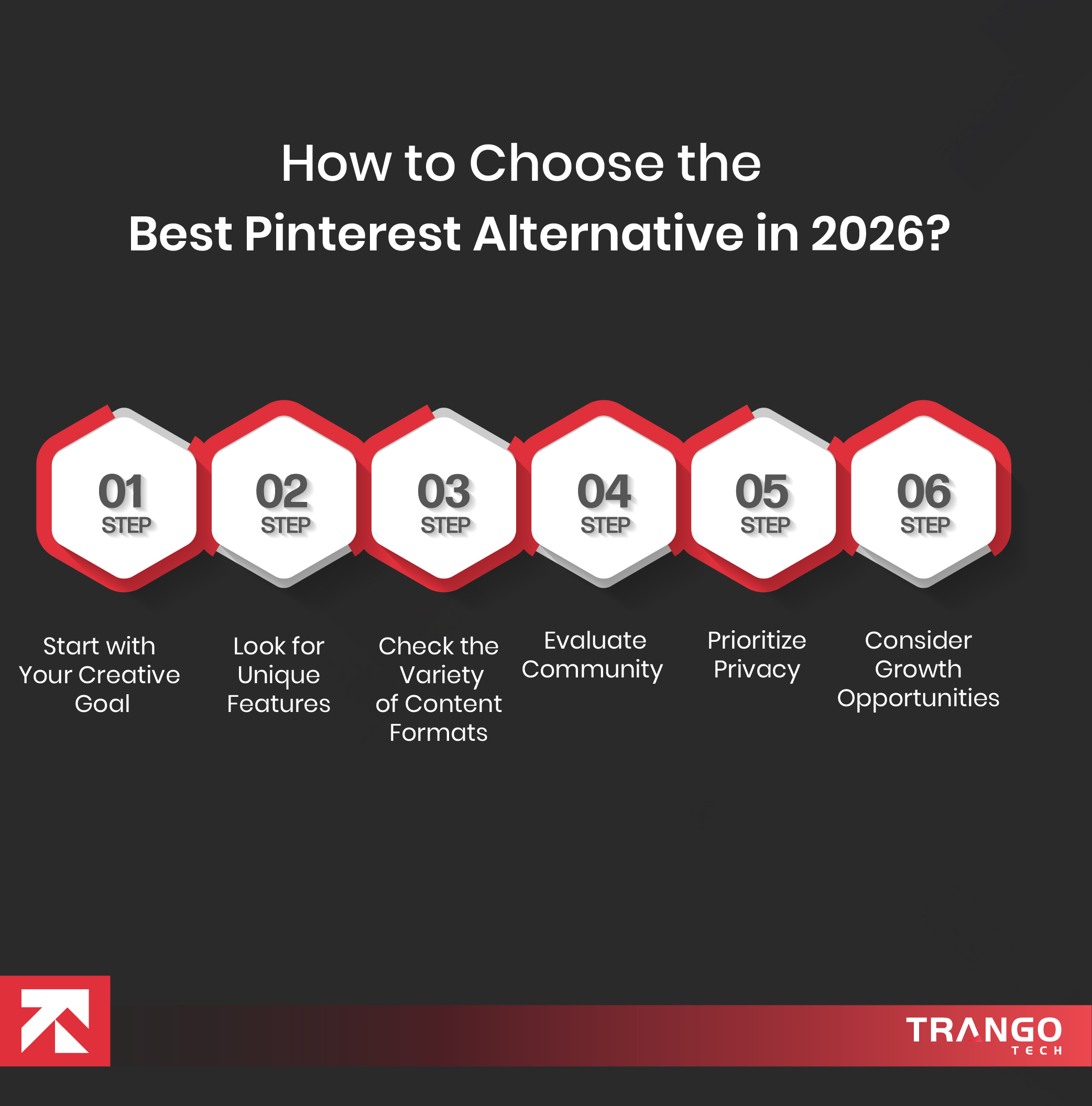
How to Choose the Best Pinterest Alternative in 2026?
To be real, the best choice for apps like Pinterest may vary from person to person. You can’t claim the single best.
Moreover, you should decide on one that aligns perfectly with your goals, style, and creative workflow.
Here is how to choose among the best Pinterest alternatives:
Step 1: Start with Your Creative Goal
Before you finalize any name, ask yourself one simple question: What kind of inspiration do you need?
Some platforms focus on polished design work, while others are best for lifestyle ideas. In addition to that, a few of them show trends.
For example:
Designers may prefer visual-first platforms like Behance
Marketers may look for discovery + analytics
Casual users may want clean, distraction-free inspiration
So the best practice is to identify the exact purpose you want to serve and opt for one of them accordingly.
With clear goals in mind, you spend time and effort on useless swiping on an app that has nothing for you.
Step 2: Look for Unique Features
Modern users want a platform that has a unique set of features and understands preferences without manual input.
The best Pinterest alternatives should use AI to recommend content based on your interests, searches, and interactions.
Instead of showing random popular posts, the platforms should gradually refine your feed and show what matters most.
In this way, you save time, keep inspiration, and feel more personal rather than overwhelmed.
Step 3: Check the Variety of Content Formats
Unlike Pinterest, which focuses merely on images, you should go for an option that goes beyond just that.
In the above given choice, the best Pinterest alternative is the one that explains the idea in depth and supports interactive content.
With the help of such richer formats, you understand concepts better, plan a design, and explore new trends.
Other than that, a platform that supports diverse content is a signal of much more creative freedom and engagement.
Step 4: Evaluate Community
Inspiration grows when people share ideas and regularly connect through posts. So does Pinterest allow.
It is paramount to check for strong community features like collaborative boards, comments, or niche groups.
These tools let users exchange ideas, work on different ideas, and explore endless possibilities for growth.
Simply put, either you are a creator or a brand, going with a good Pinterest alternative will help you build trust and grow faster.
Step 5: Prioritize Privacy
Privacy has been a very concerning issue for businesses. As per the report, almost 75% of mobile apps had security flaws.
This is why you should be more cautious about where you share your content. So choose apps that prioritize privacy.
When finalizing a name, see how it handles your app data and who owns the content you upload.
The best Pinterest alternatives will give you transparency, protect your creative work, and respect your privacy.
Step 6: Consider Growth Opportunities
If you are discerning Pinterest alternatives for personal or business use, consider how they can help you grow.
A large number of apps, like Pinterest, support affiliate links, shoppable posts, and creator monetization.
All these features, collectively, will help you turn inspiration into end-to-end income sources. You can go beyond and achieve real results.
Aiming to Thrive in The Competitive Digital World?
Create an App Similar to Pinterest Today!
Our Most Favorite Pinterest Alternative – Dribble & Tumblr
All the handpicked Pinterest alternatives above are our favorite, however, Dribble and Tumblr are our favorites for splendid reasons.
Dribble shines as a premier Pinterest alternative for designers and creative professionals. It provides an exceptional space for showcasing work, receiving constructive feedback, and networking with other talented individuals.
The platform is renowned for its high-quality portfolio display, which attracts potential clients and collaborators.
Dribble’s community feedback system is invaluable for improving skills and refining projects.
Additionally, the job listings and exclusive invite system ensure a high standard of content and opportunities for users.
Tumblr, on the other hand, offers a versatile and user-friendly experience that combines blogging with social networking.
The following Pinterest alternative supports a wide range of content types, including text, photos, quotes, links, audio, and video, allowing users to express themselves in various ways.
Tumblr’s customizable themes provide users with the ability to create unique and personalized blogs.
The platform fosters community interaction through blogs, likes, and comments, enhancing user engagement and connection.
The effective hashtag system makes discovering and following topics of interest straightforward, enriching the overall experience.
Both Dribble and Tumblr stand out when addressing apps like Pinterest due to their unique features and capabilities, making them excellent apps similar to Pinterest.
Whether you are a designer seeking a professional showcase or someone looking to explore diverse content, these platforms offer outstanding solutions.
For tailored digital solutions that align with your needs, reach out to Trango Tech. We offer cost-effective iOS and Android app development solutions to transform your business.
To End Things Off
As the list above shows, there are plenty of powerful apps like Pinterest you would love to use.
However, Dribbble and Tumblr, thanks to their visual inspiration and community-driven support, supersede all others.
These modern Pinterest alternatives combine AI driven recommendations, niche communities, and rich content formats.
If you are a business or startup, this can also be a window of opportunity. You just need the right idea and team.
At Trango Tech, we have helped 240+ brands shape their success stories. Likewise, we can do it for you, too.
Frequently Asked Questions
● Why are people looking for Pinterest alternatives?
People want more control over their feed with better personalization and fewer ad-heavy. Unlike it, Pinterest has failed to show users truly relevant content. They are switching towards platforms that offer smart AI recommendations, niche communities, and clear UX. This is what makes them ditch Pinterest.
● Can you share some of the most popular Pinterest alternatives?
Sure. Instagram, Houzz, Dribble, Tumblr tend to be the most users’ favorite Pinterest alternatives. Other than that, there is We Heart It, which works on image-based bookmarking. Also, Tumblr is best for interest-based blogging for creators. Just remember that the best choice should help you grow, not just post static content.
● How much does it cost to create your own app like Pinterest?
Creating your own Pinterest-like app can cost from $30,000 to $200,000. The final choice depends heavily on features, design complexity, and team location. For an exact cost, we recommend that you use our real-time app development cost calculator.
● How long does it take to create an app like Pinterest?
As per our observations, it takes around 3 to 7 months to develop a fully functional app like Pinterest. Your exact timeframe might change based on factors like app type, number of features, and technologies. Want to know more about it? Get in touch with the app support team to help you with this.
● How do Pinterest alternatives benefit businesses that use them?
Yes, of course. Those who use Pinterest alternatives to showcase products, share visual stories, and drive conversion will stand out. A few of such platforms even offer building analytics, shoppable posts, and monetization.
● Can you monetize content on Pinterest alternatives?
Yes, most of the platforms we have discussed so far support affiliate links, product tagging, and sponsored posts. Through this, you will easily showcase your creativity and earn money at the same time. It is ideal for influencers, bloggers, and brands for better growth.
● How can you create your own app like Pinterest?
There are primarily two different ways to get your own app like Pinterest. Either way, you can do it yourself or hire an app development company. If you want scalability, unique features, or full control, go for a custom app. If that is not the case, you may use no- or low-code platforms.
Daniyal is a passionate content writer & editor with 3+ years of experience crafting SEO-friendly blogs, web copies, and marketing content for an mobile app development company. He loves turning ideas into words that connect, engage, and deliver value. Currently working as a Senior Content Writer at Trango Tech, Daniyal holds a bachelor's degree in English Language and Literature.