Digital transformation is powering modern business these days. It is not just significant for a competitive edge but also fuel for productivity. Using multiple systems like ERP, CRM, and HRMS can create siloes. Using these tools separately can cause chaos and lead to loss of visibility and productivity.
Microsoft Dynamics 365 integration services address this by connecting ERP to CRM, unifying data, and integrating Dynamics with platforms like Shopify, Amazon, and Salesforce, so information flows seamlessly across departments.
To avoid mismatched systems, rising costs, and broken workflows, organizations need a clear integration after careful consideration of various factors, including technical, architectural, and business processes. This is significant to avoid mismatched systems, added costs, and failed workflows. Only an experienced Dynamics 365 Partner will help you implement the system without any hassle.
Let’s break down everything with this Dynamics 365 Integration guide.
Table Of Contents
What is Dynamics 365 Integration?
Microsoft Dynamics 365 lies among the top 20 ERP systems in the world. To reap the full benefits, you need to integrate it into your existing systems.
Integration refers to connecting Dynamics 365 with other products or systems to enable seamless data flow and a unified view. The disparate tools are connected using API, middleware, and connectors.
Dynamics 365 is an ecosystem of applications that provides solutions for every business operation.
Dynamics 365 Business Central
Dynamics 365 Finance
Dynamics 365 Project Operations
Dynamics 365 Field Service
Dynamics 365 Supply Chain Management
Dynamics 365 Human Resources
Dynamics 365 Customer Service
Dynamics 365 Marketing
Dynamics 365 is integrated with other systems, such as:
ERP system
CRM
banking systems
POS solution
Ecommerce
Supplier networks
HRMS
Warehouse management systems
Custom-built Apps
Why Integrating Dynamics 365 Matters
Businesses need to understand that deploying Dynamics 365 is not the end of the journey. It is just the beginning, and there is a long way to go.
Organizations use many applications simultaneously to achieve their business goals. These include POS, ERP, CRM, Supply Chain, Finance, and cloud apps. Lack of integration leads to fragments and siloes.
Reporting becomes unreliable, and manual work leads to delays and is inefficient. This is why Dynamics 365 Business Central implementation is essential for cross-platform data exchange, real-time analytics, and workflow automation.
Many obstacles arise due to a lack of integration.
Limited visibility with no real-time data
Overburdened with manual tasks like data entry
Finance teams cannot see financial data
Juggling between multiple systems instead of using a single system
Customer service teams face a problem in assisting customers without visibility
How to Integrate Dynamics 365 With Existing Systems
It is significant to assess the existing technology stack to integrate Dynamics 365. Implementing Dynamics 365 while using multiple tools, such as legacy systems, cloud, and other applications, requires precision, as you have to manage data flows and ensure compatibility. Moreover, long-term support and scalability are also crucial.
First things first, include:
Current workflow mapping
Data exchange
Laying integration objective
Choosing the right connectors
The partner plays an important role in evaluating the system and planning the D365 Business Central integration workflow accordingly. This is where an experienced Dynamics 365 partner plays a key role in meeting all your requirements.
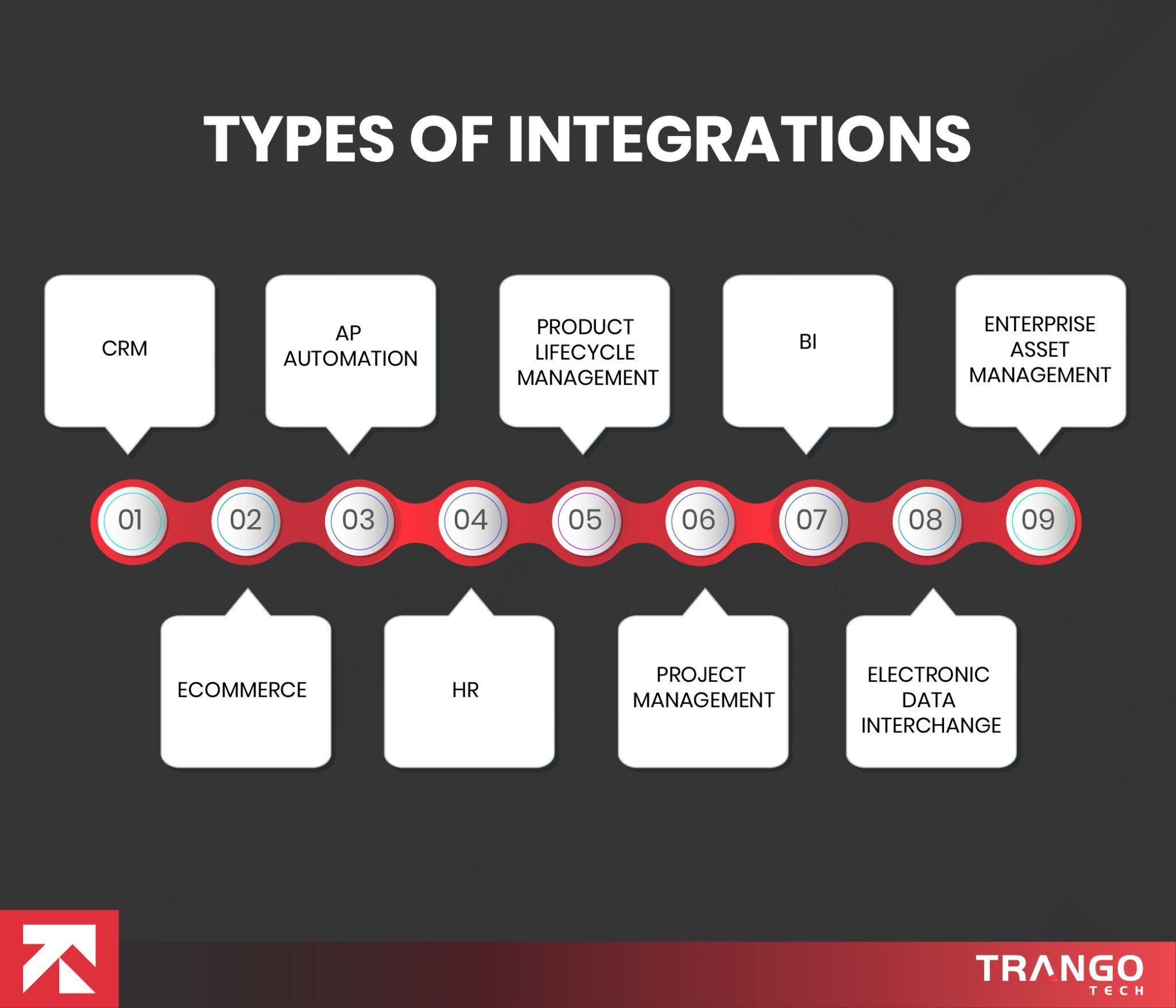
As there are many applications available, there are also many types of integrations. While ERP systems offer prebuilt integrations, businesses require industry-specific third-party apps to support the matching features and functions they need. Integration is an easy way for them to let employees use the same system with extensive functions.
CRM integration
CRM integration is significant for a complete custom review. Sales, marketing, and customer service teams can access customer history to provide instant support at all times. Real-time access helps them to close deals easily.
Ecommerce Integration
Ecommerce platforms are booming with high customer demand. The massive number of orders needs a robust system. ERP systems integrate with ecommerce platforms to offer a unified view of all the data. The streamlining of inventory management, finances, and order fulfillment improves delivery and customer satisfaction.
The faster they deliver, the better the business. It helps to achieve repeated sales. Connecting the systems leads to automatic order processing and fulfillment, saving time.
Accounts Payable (AP) Automation
Payment is an essential part of a business. AP automation software integrates with AP systems to automate invoice and payment processing. Invoices are moved to the ERP system automatically for final payment. The real-time updates make financial cloning easier.
HR
HR is an important function of any business. The integration of HR modules enables the business to use a single system for a comprehensive view of employee data. This integration offers insights into hiring needs, employee data management, payroll processing, performance, and attendance.
Product Lifecycle Management
Product development and production processes are critical. The integration of ERP and product lifecycle management software improves product quality. It helps create a high-quality product that adds value to its consumers. This integration improves efficiency, as any change to the product design automatically triggers a BOM update in the system.
The automation eliminates all errors in the production cycle.
Project Management Software
Managing projects has to be hassle-free. Integrating ETP and project management software improves planning, tracking, and budgeting. Real-time visibility into different stages, costs, and expenses helps avoid costly errors and meet deadlines.
Resource allocation is also accurate, keeping skill set and availability in consideration.
Business Intelligence Software
Decisions hold the power to make or break a business. ERP integrates with powerful analytics tools like Power BI to provide insights that support informed decision-making.
Moreover, connecting it to customer data, social media platforms, and web pages provides a 360-degree view of customer preferences to design a suitable campaign or product.
Electronic Data Interchange (EDI)
Business partners can communicate easily through the EDI. EDI systems are designed for document sharing to improve communication.
Integrating ERP with EDI enhances collaboration among partners, improves supply chain visibility, and automates compliance.
Enterprise Asset Management (EAM)
Managing assets can be challenging. Enterprise asset management systems help in managing assets.
Connecting ERP and EAM helps to manage assets, track maintenance schedules, and improve inventory planning.
Struggling with Dynamics Integration?
Connect to our experts for smooth integration services.
Challenges to Expect During the Integration
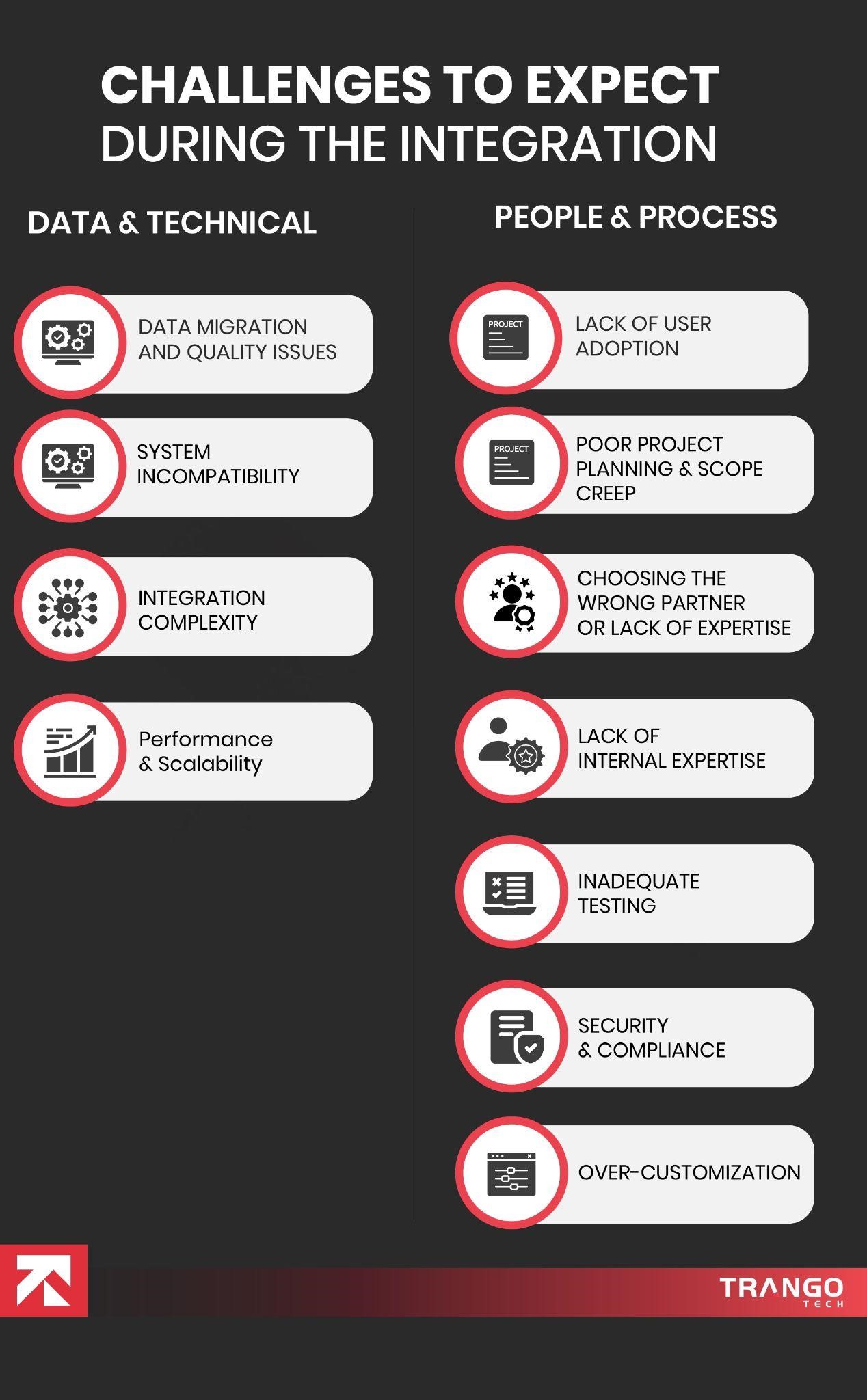
There are various challenges that a business can encounter while integrating Dynamics 365 with other systems. These challenges include data migration hurdles, technical issues, governance, and user resistance. Let’s explore the common challenges in Dynamics 365 integration and how to solve them.
Data and Technical Challenges
Data Migration and Quality Issues
Data migration seems easy but it is a long process that comes with problems such as inconsistent formats, redundancy, and outdated information.
This bad data must be cleaned to ensure the system’s reliability.
System Incompatibility and Legacy Systems
Old systems are not connected to modern API or connectors. This is why real-time synchronization becomes difficult.
Integration Complexity and Architecture
Choosing integrations and the right tools requires careful architectural planning. There are various integration approaches, such as synchronous, asynchronous, and batch processing, and choosing the right ones is critical to success. Businesses often need Dynamics 365 Shopify integration to connect their online stores for seamless operations across platforms.
Performance and Scalability
Data transfer among systems raises security concerns. A security plan must be in place to save the business from vulnerabilities.
Over-Customization
Customization is okay, but over-customization can break compatibility and make maintenance and updates difficult.
Performance and Scalability
Testing with small data yields better performance results but may not work well under high-volume environments.
People and Process Challenges
Lack of User Adoption
Using a new system can be challenging, and the users or the workforce might create hurdles by resisting adoption. To tackle the issue, proper communication, collaboration, and training must be provided to resolve the
Poor Project Planning and Scope Creep
Without proper planning, businesses may experience score creep, disrupting budgets and timelines.
Misalignment of Business Processes
Efficiency plays a key role in a business’s success. Implementing the same inefficient processes leads to disruption. This is why following best practices is significant for successful business transformation.
Choosing the Wrong Partner or Lack of Expertise
A partner plays a significant role in drinking results. Choosing the wrong partner does not fulfill specific business needs; it’s just a technical implementation.
Lack of Internal Expertise
It is hard to find someone in the organization who is an expert with the platform.
Inadequate Testing
Insufficient testing can create problems in the future and disrupt the go-live.
Step-by-Step Guide to Setting Up Microsoft Dynamics 365 Integration
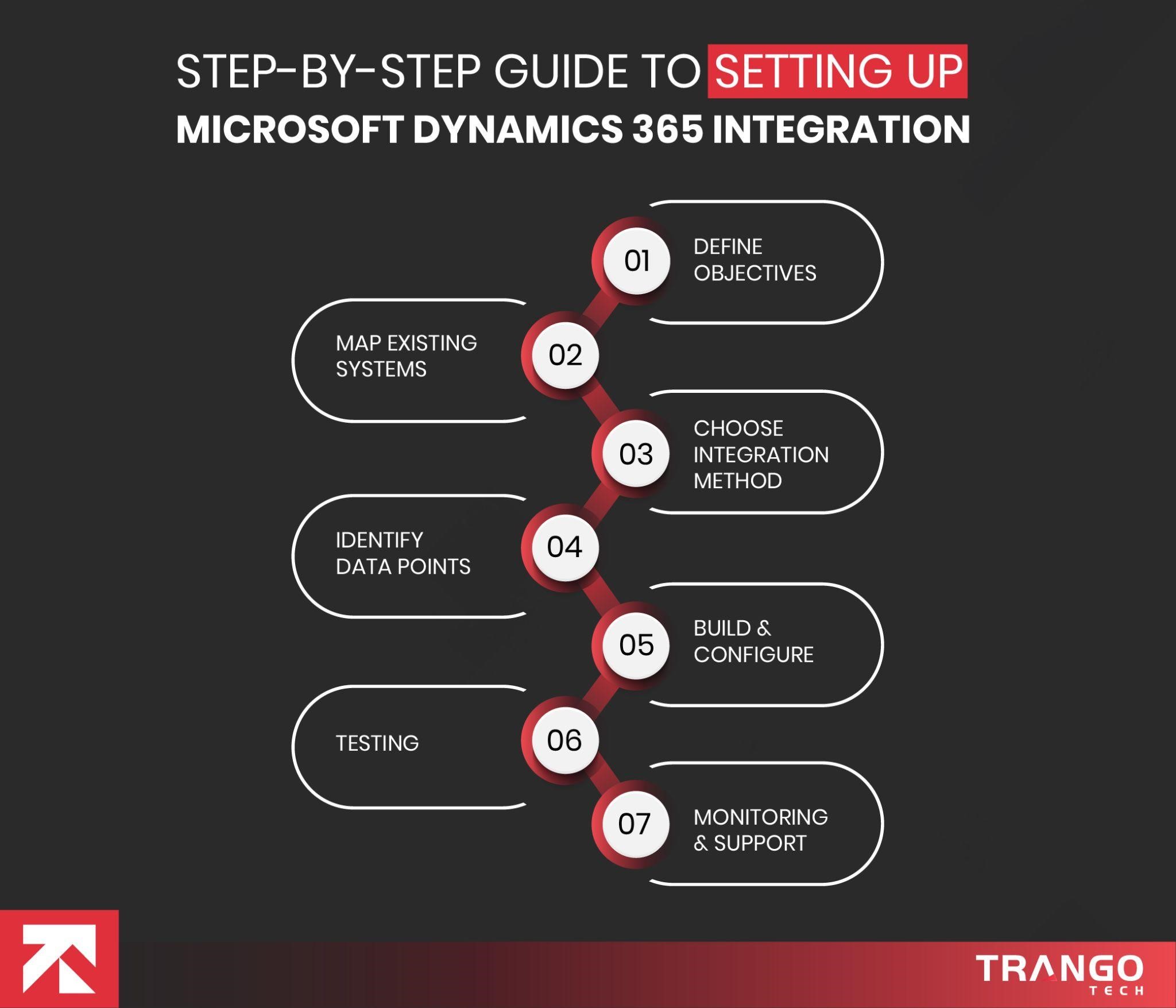
Let’s understand the integration process with this step-by-step guide for Microsoft Dynamics 365 integration.
Define Business Objectives
The first step is to realize the objective of your integration. Clearly define the integration outcome, which can range from streamlining order management to unifying customer data.
Map Existing Systems
The next step is to list the platforms you need to integrate with, including Shopify, Amazon, Magento, POS, HRMS, etc.
Choose the Integration method
The next step is to choose the integration model.
It can be:
Point to point
Middleware
Custom API
Identify data points
You must identify the significant data that you need to synchronize across systems.
Building and configuration
This step involves developing:
API authentication
Triggers
Connectors
Data pipelines
Testing
Now is the time to test the system. Conduct various tests that include performance tests, nit tests, failover tests, exception handling tests, etc.
Monitoring and Support
Aftercare is essential to ensure the system runs smoothly. Keep an eye on the system to identify bugs in time and work towards prior resolution before they escalate.
Dynamics 365 CRM and ERP Integration
The core purpose of the Dynamics CRM and ERP integration is to allow all the teams to work on the same data. CRM is for customer-centric activities, while ERP includes supply chain, finance, HR, manufacturing, and operational needs. The Dynamics 365 CRM and ERP integration process explains that both systems need to connect to allow the business to have a unified view, avoiding mismatches, discrepancies, and duplications.
Cost of Integrating Microsoft Dynamics 365 With Third-Party Apps
Integrating Microsoft Dynamics 365 depends on various factors, including the number of systems, complexity, and data volume.
The integration of basic tools like marketing requires lower cost, as they already have ready-made connectors.
Whereas complex systems require extensive mapping, testing, and transformation logic.
The cost also depends on the type of connector you use.
Additionally, real-time integrations may cost you a lot for continuous data modeling and monitoring. Many businesses on Amazon require Dynamics 365 Amazon integration to monitor the order flow, pricing, and product updates.
Real-time integrations tend to be expensive as they require continuous data accuracy, error handling, and system uptime.
Real-time integration is essential for retail and ecommerce businesses as they need to manage inventory, pricing, and orders globally across their warehouses and store locations.
So, real-time updates required by businesses using legacy systems may cost more as they lack modern APIs. This is why developers have to create custom middle layers and ETL pipelines.
To sum up, small-scale integration can cost a few thousand dollars, but enterprise-grade, multiplatform integrations leveraging AI and real-time data may cost tens to hundreds of thousands of dollars. The ERP cost and pricing also depend on the number of modules you need.
Choosing the right integration Tools
Businesses need to choose from a wide range of tools offered by Dynamics 365. Choosing the right integration tools for Dynamics 365 is necessary based on business requirements, budget, and future goals.
For Simple tasks
Power Automate offers low-code automation and addresses the need for contact syncing, alerting, and field updates.
For high-volume integration
Azure Logic AppsApps can be used for advanced capabilities with REST APIs, SOAP,, and file-basedfile-based connectors.
Azure Service Bus supports high-volume event processing for massive real-time transactions.
For Legacy systems
To connect old systems to the modern system, it is significant to use ETL tools, data gateways, and APIs. Integration platforms are used as a service to centralize operations across different locations. These are better for maintenance and reduced complexity.
For Future Expansion
The future relies on your present. Businesses need to consider their future needs by analyzing factors such as global expansion and new feature additions.
AI Integration: The Future-Proof Layer for Dynamics 365
Integrations are not just about connecting a system and migrating data. It is a smart integration that enables better, more informed decision-making by leveraging insights and smart workflows.
Dynamics 365 leverages AI/augmented automation, leading to hyperautomation. Trango Tech connects Dynamics 365 to ML, AI, and RPA to enable predictive demand forecasting, fraud detection, and other useful use cases.
If we talk about ERP, CRM, and ecommerce integration, where AI models can work wonders by alerting to stock shortages and suggesting reorder quantities through automation. It eliminates all the manual work. This helps the ecommerce business restock on time and meet customer demand through predictive forecasting. AI models can analyze customer data to create personalized marketing campaigns and offers that attract customers.
Businesses using Power Platform can connect it to Dynamics 365 for robust data management. Moreover, adding AI enables continuous data analysis. The tasks are automated using business logic.
AI integration enables intelligent business automation, helping businesses prepare in advance to keep customers happy at all times and scale as needed.
Security, Compliance & Data Governance in Integration
Your Dynamics 365 integration becomes worth it with advanced security. Compliance and security are taken seriously to save from unexposed threats and operational failures.
Key Practices
Authentication & Authorization: Secure identity management and role-based access with limited privileges.
Encryption: Data transfer through TLS/SSL with encryption.
Audit Logging & Monitoring: Logging all access, transactions, and updates, and using monitoring tools to track unusual activity.
Data Validation & Cleansing: Check all data fields to reject invalid data that may corrupt master records.
Role-Based Access Control (RBAC): Set up role-based access for strict data control. This saves the sensitive data from unauthorized access.
Compliance & Regulatory Readiness: For international businesses, compliance with GDPR and CCPA is mandatory while maintaining privacy policies and data residency.
Governance Framework: Maintain documentation for all your data models, rules, logic, and
ownership for audit readiness.
Security and governance are to be taken care of from day one to ensure your business operates without disruption across all geographies.
Break down silos and boost your productivity with Dynamics 365 integration
Get in touch with our expert ERP consultants to start your productivity journey.
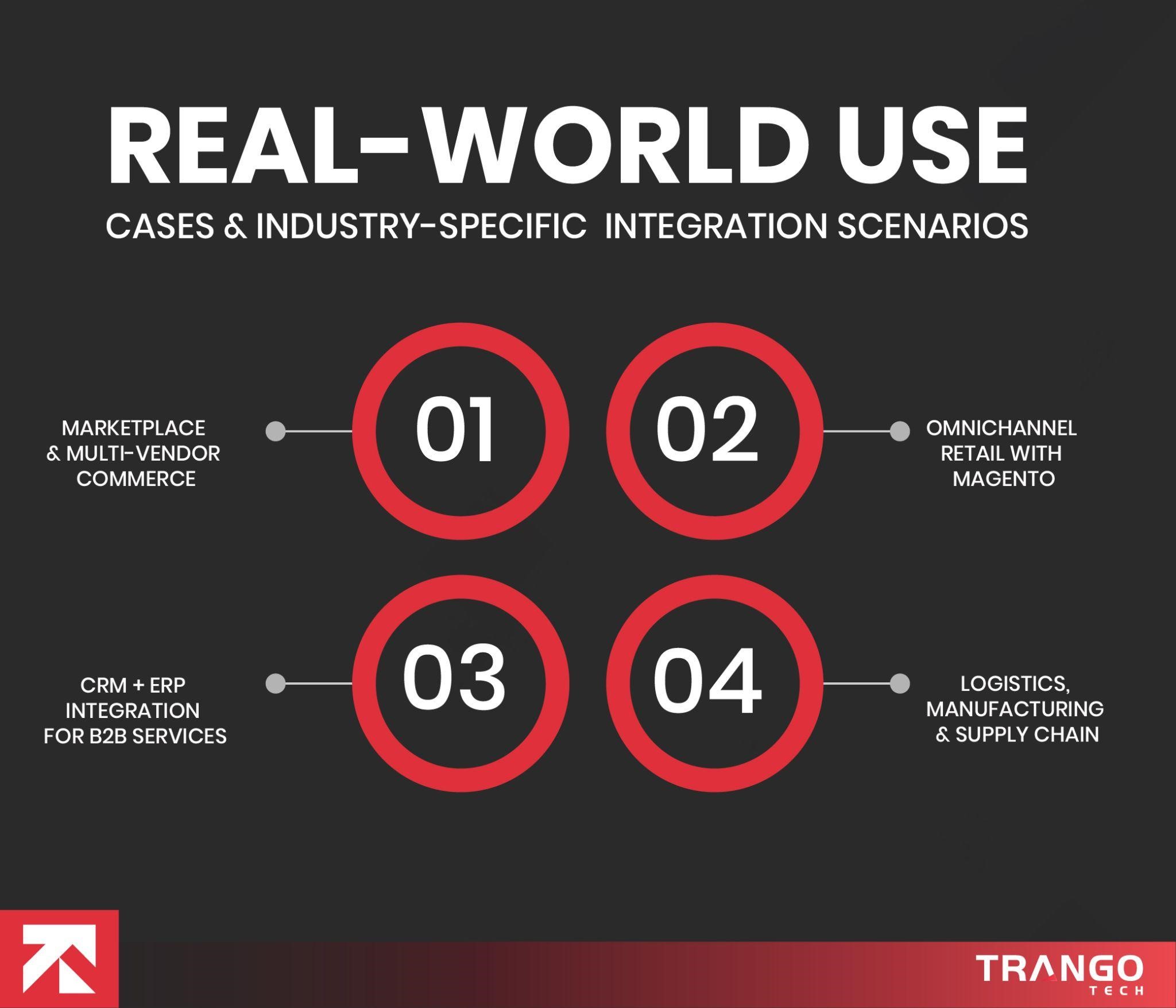
Real-World Use Cases & Industry-Specific Integration Scenarios
To better understand the system, let’s discuss real-world use cases that effectively solve problems.
Retail and Ecommerce
Brands selling on multiple platforms can use the Dynamics 365 Shopify integration to sync all data in real time. As soon as an order is placed, it shows up in Dynamics 365. Everything is handled automatically. The order is processed following inventory updates and invoice generation.
Additionally, the data is used by the Power BI dashboard for future communication, such as seasonal promotions and sales forecasting.
Marketplace & Multi-Vendor Commerce
Marketplace integrations are significant for businesses these days. Amazon is a large marketplace, and the Dynamics 365 Amazon integration enables brands to manage orders, pricing, returns, cancellations, and stock updates. All updates are reflected instantly in the ERP system without any manual intervention.
Finance modules also help with all the money-related matters, including taxes and sales data.
Omnichannel Retail with Magento
Many businesses use Magento for online stores. Dynamics 365 Magento integration allows them to sync orders directly into the ERP with real-time updates and unified customer profile views.
CRM + ERP Integration for B2B Services
Services businesses use Dynamics 365 CRM and ERP integration to create invoices, project orders, and bills, and all tasks are unified, offering complete transparency into operations and sales in ERP.
Logistics, Manufacturing & Supply Chain
Integrating CRM, ERP, and warehouse management systems leads to real-time tracking of operations. Manufacturing firms can track production orders and inventory levels in real time. The streamlining of the supply chain leads to better fulfillment by automatically generating SK replenishment when the k-levels run out.
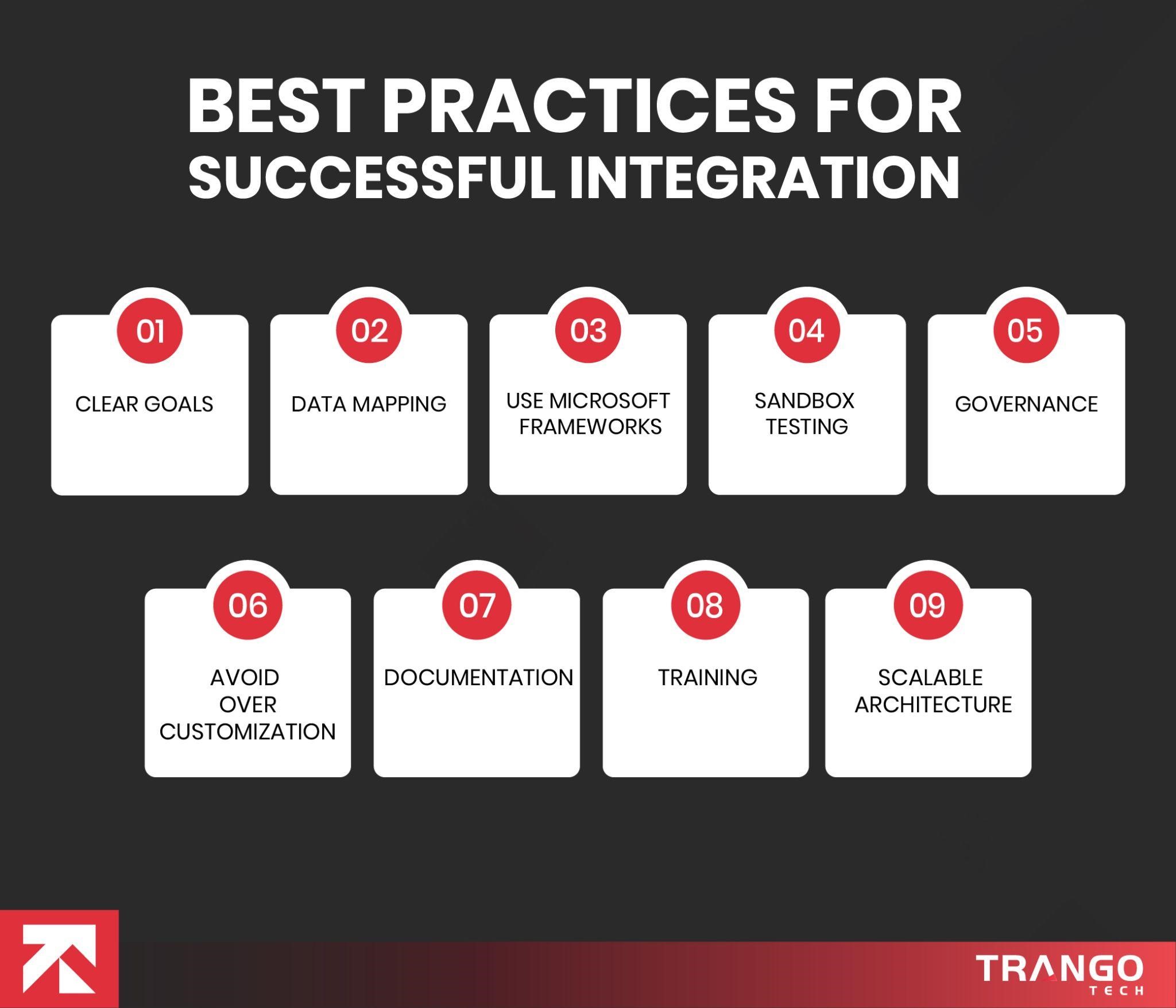
Best Practices for Successful Integration
Successful integration does not happen overnight. It requires long-term strategy, planning, and governance.
Certain practices improve your system’s performance. These are the best practices that make your integration worth it.
Clearly Define Goals
All your integrations are meant to solve a problem.
Data Mapping
The information shared must be clean.
Utilize Microsoft Frameworks
Use Azure and other data connectors.
Sandbox Testing
Conduct sandbox tests instead of direct deployment.
Establish Governance Rules
Set access for security roles and define compliance policies.
No to Over-Customization
Customize only what you need, as over-customization may cause setbacks.
Document Everything
Documentation is necessary for future upgrades or audits.
Training and Change Management
It is essential to train the teams to use the new system by offering training materials.
Scalable Architecture
Use iPaas and middleware to support future integrations without disrupting the system.
These best practices for successful Dynamics 365 integration set the ground for all enterprises. A centralized Dynamics 365 integration saves businesses from failures.
Tired of using disconnected systems?
Get your Dynamics 365 Integration today.
Benefits of Dynamics 365 Integration
You are always seeking the benefits a system provides. Dynamics 365 saves you from the hassle of managing complex application ecosystems. Explore the benefits of automating workflows with Dynamics 365 integrations.
Unified data model
Centralizing data solves all core problems. A consistent view of data eliminates data siloes and friction.
Businesses get a complete picture of their assets, customer data, and more. The data is pulled from various sources and converted into a standard format.
Now there are no barriers between departments as everyone works on the same data.
Data analysis becomes faster with real-time data monitoring. This leads to data-based decision-making.
For instance, industries can standardize their data for consistent monitoring. Retail and ecommerce businesses can utilize the centralized customer data for personalized marketing.
Improved workflow automation
Workflow automation is one of the biggest reasons to invest in Dynamics 365.Manual processes are full of errors and reduce downtime
Automation of repetitive tasks helps eliminate human errors completely.
Real time triggers help deliver faster responses to the consumers.
Teams can focus on strategic tasks and make smarter decisions with real time data.
Traditional automation is not the solution. AI and specialized workflows are meant to automate repetitive tasks, build smarter systems, and improve accuracy.
This saves employees in the organization a lot of time. It saves space for creativity.
Cross-platform data exchange
Collaboration among multiple systems enables instant information exchange. Inventory updates, customer insights, and shipment information lead to faster fulfillment and services.
Connecting different systems enables the same information to be shared, minimizing errors and boosting communication and collaboration.
Enhanced reporting and analytics
Data shows up in analytics tools, offering a deeper view of operations.
Finance, operations, sales, and marketing teams can track revenue, monitor operations, and analyze customer preferences.
This leads to the creation of strategies that cater to consumer needs and deliver faster ROI.
Enterprises can analyze trends and make informed decisions and develop scaling strategies.
Real-time data processing
Instant data synchronization is the key to success in this data-driven world. Updated data across departments helps them in making decisions that drive value.
Inventory levels, latest transactions, and order details update instantly. Businesses can respond quickly to urgent requests and market changes without wasting a single second.
Better customer experience
This integration creates a pleasant customer journey that delivers fruitful outcomes. Orders are delivered on time, inventory is up to date, and personalized offers are sent to customers’ inboxes.
These help to build stronger relationships with customers that drive repeated sales and high ROI.
Improved workflow automation
Automating manual tasks eliminates error-prone processes. Streamlining tasks minimizes human intervention, freeing up time for employees to focus on strategic tasks. AI automation improves efficiency by completing the work faster while minimizing errors.
Automated workflows lead to significant cost reductions. The automated systems offer insights through dashboards to support faster, more accurate decisions.
Employees eliminate mundane tasks to focus on creative work. It is easier to meet compliance and external policies.
Operational accuracy
As the name suggests, operational accuracy refers to the accuracy of business operations. Certain tasks need to match the desired standards. These include order fulfillment, data entry and accuracy of supply chain.
Operational accuracy is critical to delivering quality services and exceeding client satisfaction. Automated workflows and data migration lead to accuracy, eliminating manual work and errors.
ERP integration with retail and ecommerce marketplaces leads to on-time deliveries, accurate cost and shipping optimization.
Conclusion
Integration is no longer treated as an additional service; it is a core function and the foundation of modern enterprise architecture. A clear Dynamic 365 integration architecture for enterprise companies delivers on its purpose by providing business value.
From small businesses to global enterprises, all companies can benefit from data synchronization, real-time analytics, AI-powered insights, and multi-channel commerce. It is not just connecting systems but improving efficiency, accuracy, and operations. A clear Dynamics 365 integration strategy for digital transformation will help you in the long run.
Additionally, the presence of a certified Dynamics 365 partner will not only assist you in designing and implementing but also offer ongoing support and maintenance.
FAQs
1. What is Dynamics 365 integration, and how does it work?
Microsoft Dynamics 365 integrations refer to connecting internal and external systems, legacy softwares, third-party apps, and custom applications for seamless data flow. The integration aims to provide a single source of data for all departments across the organization.
2. How to reduce errors using automated Dynamics 365 integrations?
To reduce errors, use automated validation rules, error handling workflows, sandbox testing, schema mapping, and monitoring.
3. How to connect Dynamics 365 with Power Platform and Azure?
Use Dataverse, Power Apps, Power Platform, and Azure services for advanced capabilities.
4. How to improve data flow across departments using Dynamics 365 integration?
A unified data model, standardized formats, and shared master data entities ensure data flow across departments.
5. How to evaluate the ROI of Dynamics 365 integration projects?
Evaluate the ROI of Dynamics 365 integration by
Identifying manual labour hours
Improved reporting
Lesser errors
Increased satisfied customers
6. What challenges occur during Dynamics 365 integration?
Various challenges may occur during Dynamics 365 integration, including,
Security gaps
Legacy systems incompatibility
Data errors
Lack of governance
Scalability issues
7. What are the most common Dynamics 365 integration methods?
The most common integration methods include,
API
Middleware-driven integration
Hub and spoke architecture
ETL pipelines
8. Can Dynamics 365 be integrated with legacy systems?
Yes, Dynamics 365 can be easily integrated with legacy systems using custom connectors, ETL tools, middleware, and API gateways.
9. Do I need a Dynamics 365 integration partner?
Yes, you need a well-known partner like Trango Tech to assist you in the enterprise-grade integration. A partner will handle all the complexities, including data migration and compliance, to create a robust architecture for long-term growth.
10. How to minimize downtime during Dynamics 365 integration?
To minimize downtime, you must implement the solution in a phased rollout. Conduct testing in a sandbox environment, following an incremental data migration approach.
Meet Ahsan, the strategist behind some of the most insightful content on Dynamics 365, Business Central, and enterprise transformation. Armed with a deep understanding of Microsoft’s business applications ecosystem (and a steady supply of coffee!) Ahsan has spent years helping organizations navigate the world of ERP, CRM, and digital modernization. Currently working at Trango Tech, a trusted Dynamics 365 Partner, Ahsan brings real-world expertise to every piece he writes. So grab your favorite drink and get ready to explore the ever-evolving landscape of Dynamics 365 and Business Central with Ahsan as your guide.