Imagine sitting in your office on the first floor and being unable to reach the HR team member on the 8th floor for an important query. Will you be going up and down again and again? If you are in the sales team and need to contact finance on the 15th floor, will you be leaving your desk to get every little detail? Imagine how tiring and hassling it would be.
Now imagine having a system where you can contact the HR, check the details you need, and get work done without leaving your desk. Sounds great, right? Simple and easy. That’s how APIs work.
APIs connect different systems for seamless communication and smooth operations.
Connecting different systems is the core function of implementing an ERP system. Business Central uses API to connect different systems and share data between systems. The software serves as a unified solution for all businesses. An experienced Dynamics 365 Partner will help you with seamless Business Central integration
APIs are significant for connecting various platforms in a single, unified solution. Business Central APIs are the pillar of robust, scalable, and future-ready ERP solutions. Every business founder, developer, ERP consultant, IT team, and end user needs to learn how APIs work with this guide, offering complete details.
Table Of Contents
Why Business Central Matters to Organizations
Business Central is among the most well-reputed and highly respected tools for managing business, with advanced AI and automation features that improve productivity and efficiency. Dynamics 365 Business Central implementation allows businesses to thrive in a competitive environment.
Automation
Automating workflows saves time that can be spent on more productive activities. All the tedious, time-consuming, error-prone tasks are replaced with automation. Define your ERP requirements to automate workflows.
AI capabilities furthermore enhance the systems, minimizing stockouts, delays, and overselling.
Financial visibility
The instant view of all financial transactions keeps businesses up to date at all times. Stakeholders can assess the current scenario and dive deeper into trends by using Copilot.
Seamless integration
Pre-built connectors and flexible APIs unify data, connect systems and communication channels, and boost collaboration.
Scalability
Scaling is a concern for any business considering a Microsoft ERP API. Global enterprises can easily adopt it as it grows alongside businesses, ensuring compliance and security.
Need custom APIs to connect your applications to Dynamics 365 Business Central?
Let our team create Enterprise Grade custom APIs for your business.
What Is the Business Central API?
Business Central uses a point-to-point API to integrate external systems. The Business Central REST API allows external systems to securely connect and interact with Business Central.
A very simple example would be reading ERP data to update customer records, creating transactions, and synchronizing data between systems.
Dynamics 365 API helps businesses avoid manual work through real-time integration. Explore the complete Microsoft Dynamics 365 Integration Guide to learn more about integrations.
The basics matter the most, and to understand Dynamics 365 Business Central API, you must learn the basic terminology to better understand the Microsoft ecosystem.
Tenant
An instance allocated to an organization has data, configurations, and an environment. A tenant-specific URL is used to maintain the company’s unique data identity.
Environment
It is a logical container to store data.
There are two types of environment:
Production
Sandbox
Production is used for live data, while the sandbox is used for testing and development.
Company
It is a unique business or organization in the business central environment.
OData Open Data protocol
OData is a standard for building RESTFUL APIs that support common methods.
API Page
Shows Business Central pages as an API to perform CRUD operations.
API Query
A read-only endpoint for filtering complex data.API Queries do not offer data modification.
Authentication (Microsoft Entra ID / Azure AD)
Microsoft Entra ID is used for authentication and authorization. A valid access token is used to authorize API requests.
OAuth 2.0
This authentication framework offers access to Business Central APIs.
Service Principal / App Registration
A security identity is needed to register your application in Microsoft Entra ID.
Client ID
A unique identity is assigned after registering in Entra Id.
Client Secret
A secret key for registering your application in Entra id.
This identity verifier must be stored securely.
Access Token (Bearer Token)
A time-sensitive credential issued by Entra after authentication.
Refresh Token
A long-lived credential to acquire new access tokens without re-authentication.
Permissions
It’s permission to access data and perform operations via the API.
Scopes
It is a fixed access level used for reading, writing, and managing data.
Rate Limits (Throttling)
Excessive traffic requests are restricted by limiting users, companies, and endpoints.
The default limit is 600 users per minute and 100 concurrent connections per environment.
Webhooks (Change Notifications)
These alerts are sent to notify of data changes occurring in Business Central. The change notification APIs are used to implement the webhooks.
How to Use Business Central API
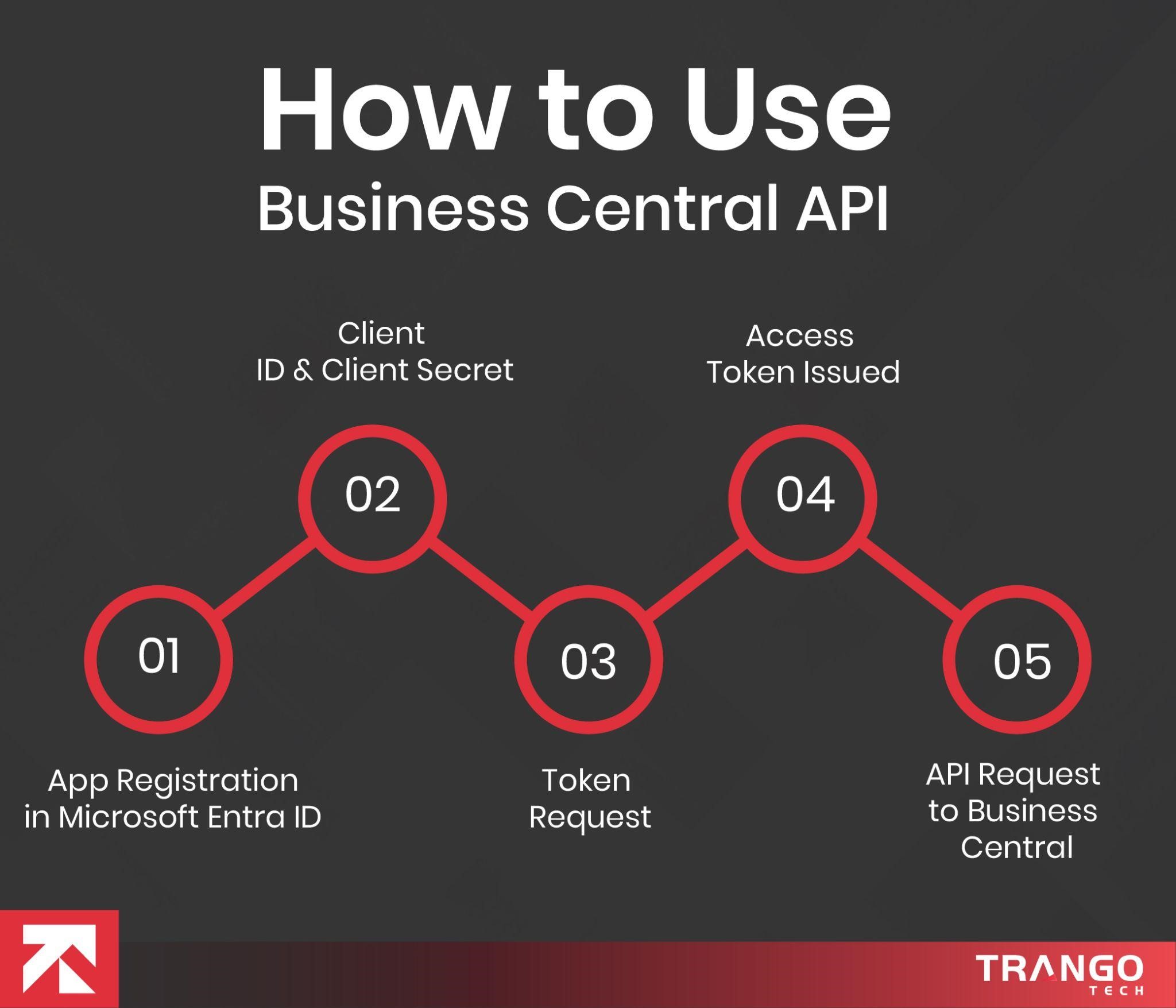
To use the Business Central API, first create an ID in Microsoft Entrance, then make standard REST API calls.
Step-by-Step Guide
Set up authentication in Microsoft ENTRA ID.
Register an application:
Sign in and create a new application to get your Application ID and Directory (tenant) ID
Grant API permissions
Permit Dynamics 365 Business Central
You can use these options.
Application permissions
AdminCenter.ReadWrite.All
Delegated permissions
Create a client secret.
Crete secret using Certificate $ Secrets tab
Configure in Business Central
Open the Microsoft Entra Application in the Business Central and set up the ID and grant permissions.
Watch a Business Central API tutorial to understand the registration method.
2. Obtain an Access Token
Now request an access token from the Microsoft Entra ID OAuth 2.0 endpoint.
Business Central API Endpoints List (Standard APIs)
Various standard APIs cover a wide range of business functions.
Let’s explore the Business Central API examples.
Human Resource
Company information
Employees
Aged accounts Payable
Aged accounts Receivable
Finance
Accounts
Currencies
Payment method
General ledger accounts
Payment terms
Sales
Orders
Invoices
Quotes
Shipments
Customers
Invoice lens
Credit memos
Inventory and Logistics
Items
Units of measure
Shipment methods
Location
Inventory transfer order
Units of measure
Business Central API Pagination, Filtering & Query Options
Business Central provides users with pagination, filtering, and querying using standard parameters.
Pagination
Large data sets are split into smaller chunks, a technique known as server-driven paging.
Business Central will not return all records in a single request.
Server-driven paging
The server-driven paging has a maximum number of entities per page. The @odata.nextLink determines if there are more pages available. This link will help you get the next set of results.
It is good to follow @odata.nextLink instead of manually searching for offsets.
Stop until it returns a value.
Client-Driven paging
For client-driven paging, you can use commands like $top=100 and $skip=500 to set the start and end limits to retrieve pages.
$top to Control Page Size. It controls the number of records displayed per page.
Business Central has set maximum limits, and it will automatically cap them if they are exceeded.
Filtering Data with $filter
Only relevant records can be displayed using filtering.
GET /customers?$filter=country eq ‘UK’
Sorting Results with $orderby
It is used to control the order of results.
Selecting Specific Fields with $select
It is used to get the specific field.
Example
GET /customers?$select=id,number,displayName
GET /items?$orderby=lastModifiedDateTime desc
Response time will be faster, and memory usage will be lower.
Expanding Related Entities with $expand
Used to call related records in a single call.
Example
GET /salesOrders?$expand=salesOrderLines
Combining Query Options (Real-World Example)
You can use a query to call customers in a country using key fields.
GET /customers?
$filter=country eq ‘USA.’
&$select=id,number,displayName
&$orderby=displayName asc
&$top=100
The results are returned in alphabetical order, paginated in batches.
Performance & Integration Best Practices
Use @odata.nextLink to get the records.
Use select to fetch related entities.
A filter can be used for minimal data transfer.
Pagination, filtering, and query options are significant for developing enterprise-grade integrations.
Example URL parameter
$select
To request the properties you need.
?$select=id,displayName,address
$filter
Select entities for a specific criterion
?$filter=fieldName eq ‘value’
$count
Total count for matching requests.
?$count=true
Business Central API Error Codes and Fixes
HTTPS status codes and OData errors are used to categorize errors. Let’s have a look at some common Business Central API error codes:
Client Errors
A modification request is needed for the application.
The Business Central API error codes can include syntax errors with invalid characters or formatting.
400 Bad Request
These Dynamics 365 API issues include incorrect URL Syntax, typos, and missing fields.
401 Request
Wrong login credentials, such as invalid or expired information.
403 Forbidden
An authentic user requires permission to access the specific page.
404 Not Found
The record does not exist.
409 Conflict
Record modified by another user.
429 Too Many Requests
Exceeding the standard limits for API calls.
Common Server-Side Errors
500 Internal Server Error
An error occurred due to a crash or a server-side issue.
502 Bad Gateway
The server is down due to maintenance.
Application Specific Error
Application_StringExceededLength
Exceeding the maximum character limit for a field.
Internal_CompanyNotFound
Company name not specified.
Are you struggling with Standard API limitations?
Let our developers create custom APIs matching your workflows.
Standard APIs handle the most common business transactions.
These standard integrations work well with Power Platform, CRM, and accounting tools. Custom fields cannot be added to the standard API. A separate custom API must be created.
Examples include
Sales Orders
Purchase Orders
Customers
Vendors
Invoices
Journals
Items
Dimensions
Standard APIs are maintained by Microsoft and are upgraded safely. Standard APIs support OData query options and offer a consistent schema across tenants.
Custom APIs
Developers use AL API development to create a custom Business Central API tailored to specific requirements.
Custom APIs are created when businesses need tables, fields, specific data, and non-standard Business Central API endpoints.
API Pages
For CRUD operations
API Queries
Used to implement
Custom APIs are developed in Visual Studio Code using AL API pages. The extensions are then deployed to the environment.
Standard Business Central APIs Usage
The standard Business Central APIs are used when a business does not need custom logic. It is a fast and reliable option for them to integrate CRM, ecommerce, or BI tools.
Sales Order sync
After integration, they can see their sales orders in Business Central.
CRM customer sync
Complete customer profiles are shared in Business Central.
Payment Gateway invoice updates
Status of payment in Business Central
Power BI
Power BI reports are created using Business Central data.
Versioning & Upgrade Considerations
Microsoft manages versions
Custom Business Central APIs Usage
The purpose of creating custom API s is when required fields are not available in the Business Central standard APIs. Businesses need custom tables, calculate data, and domain-specific Dynamics 365 API endpoints or validation logic.
Industry-specific workflows:
To match an industry-specific process.
Middleware-driven integrations
Connecting Business Central to other apps for data flow.
Loyalty points integration
Customers earn loyalty points through shopping and store them in Business Central.
Custom pricing engines
Pricing rules automation for saving orders in Business Central.
Versioning & Upgrade Considerations
Developers or the business control the version.
Security & Authentication
The standard and custom APIs use the same security and Business Central API authentication protocols, which include:
Role-based access
Azure AD authentication
What to Avoid
Only build custom APIs that do not replicate standard APIs
Take care of permission checks to avoid unauthorized access
Avoid sharing excess data that compromises API speed
Do not lock the API to avoid problems during updates
Don’t load the data at once; use pagination
Standard APIs are meant to cover 80-90 percent of integration needs, whereas custom APIs are used to fulfill specific demands for business logic, data, or domain.
Business Central API Integration Use Cases
Businesses can now connect their core data with other systems through API integration. They can create a connected digital enterprise with these integrations.
CustomField Service Applications
Workforces are now empowered with mobile applications. Technicians and sales representatives can access mobile apps for on-the-go access. A custom mobile app for technicians has the following APIs:
Items API: The app has an items API for checking inventory
Customer API: For viewing complete customer information.
Service Tasks API: To update job status.
Sales Invoices API: To send invoices instantly
Ecommerce Order and Inventory Synchronization
Real-time data syncing is significant for running an online store. The integration of your ERP and online store is significant for data exchange. Dynamics 365 Shopify integration will connect your Shopify store to Business Central for seamless data exchange. Whereas Dynamics 365 Magento integration syncs orders and offers a live data view.
Sales Order API
A new sales order is created in Business Central. The status is also updated after the order is shipped with complete tracking information.
Items API: For checking stock updates to prevent overstocking or understocking
CRM and Sales Process Integration
Fulfillment and invoicing are significant for making a sale. The customer service heavily depends on faster fulfillment and accurate invoicing.
After a successful sales opportunity, the order is created using the Sales Order API.
Customer API: New contacts are created as customers in Business Central.
Sales Invoices API: The CRM pulls data from Business Central, offering a clear customer financial review.
Procurement and Vendor Management
The procurement lifecycle is automated from request to payment.
A purchase order is created in Business Central with integration after the employee creates a purchase request by filling out the web form.
The vendor receives the PO via email, and the integration updates it as received but not invoiced in Business Central.
After invoice generation, it is matched with the PO and receipt.
Finally, the invoice is posted.
Power BI and Advanced Analytics
Organizations using multiple tools and ERPs need to analyze data through a single dashboard.
Business Central API is used to pull data from various sources. The data is loaded on the cloud.
Power BI connects to data sources and creates dashboards that display essential KPIs.
Business Central API and Governance
Governance matters the most when it comes to security and compliance of Business Central. Strong API governance helps protect sensitive data.
Access control
Permission sets, authentication, and offer access to the data needed for the specific integration. It prevents unauthorized access, which makes the data vulnerable.
Auditability
Auditability is the core strength of Business Central. The transparent view of all the transactions in Business Central as they are created and updated via API. It offers a complete view of the activities done on the system and by whom. This is why Business Central remains traceable, and businesses can perform audits easily.
Compliance Alignment
Alignment with regional and financial regulations helps in the smooth operation. Data encryption, authenticated access, and transaction logs eliminate security risks and the need for manual intervention.
Change Management and Versioning
All kinds of disruptions are minimized with change management and version upgrades. API version upgrades do not cause integration breakage during enhancements.
Proper API upgrades promote the safe evolution of the ERP system. You need to choose the right Dynamics 365 Partner to help manage change. Discover how to choose the right Dynamics 365 Partner with this comprehensive guide.
Conclusion
Modern ERP integration is complete, with Business Central APIs connecting systems to create a strong, unified system offering. All external applications are integrated into Business Central, allowing businesses to rely on a single system for every detail. Business Central development sets the foundation of a system that automates intelligently, operates in real time, and scales unconditionally.
FAQs
What is the Business Central API?
Business Central APIs use RESTful APIs to connect external systems for seamless data sharing and execution of business logic.
What are the types of APIs?
There are two types of APIs: standard and custom.
Standard APIs are already built and do not require any coding or setup.
Custom APIs are created by the developers using AL object types.
Does it offer real-time integrations?
Absolutely, it offers real-time integration to provide the most up-to-date information.
Which industries can benefit the most from Business Central APIs?
Business Central API benefits manufacturing, construction, ecommerce, healthcare, Finance, professional services, logistics, food and beverage, and agriculture industries.
Do Business Central APIs provide security?
Business Central APIs offer robust security measures, including OAuth 2.0 Business Central, Azure AD identity management, role-based access, and permission sets.
Meet Ahsan, the strategist behind some of the most insightful content on Dynamics 365, Business Central, and enterprise transformation. Armed with a deep understanding of Microsoft’s business applications ecosystem (and a steady supply of coffee!) Ahsan has spent years helping organizations navigate the world of ERP, CRM, and digital modernization. Currently working at Trango Tech, a trusted Dynamics 365 Partner, Ahsan brings real-world expertise to every piece he writes. So grab your favorite drink and get ready to explore the ever-evolving landscape of Dynamics 365 and Business Central with Ahsan as your guide.